
 Download Netflix videos to MP4 or MKV format in 1080P Full HD resolution.
 English
 Arabic
 Chinese (Simplified)
 Chinese (Traditional)
 Croatian
 Czech
Czech Danish
 Dutch
Dutch Finnish
 French
 German
 Greek
Greek Hebrew
 Hindi
Hindi Indonesian
 Italian
 Japanese
 Korean
 Malay
Malay Norwegian
 Polish
 Portuguese
 Russian
 Slovenian
 Spanish
 Swedish
 Thai
Thai Turkish
 Ukrainian
 Vietnamese


Looking for the best Chrome extensions for YouTube? Check out the 5 reliable YouTube Video Downloader extensions and its alternatives in 2025 to save YouTube videos effortlessly.
“What is the Google Chrome extension that can be used to download videos from Youtube?” – From Quora
In order to watch YouTube videos without ads interruptions, many users are looking for ways to download YouTube videos to watch offline. While YouTube doers offer a download feature, it is only available for Premium subscribers ($13.99/month). However, the ongoing subscription cost is not practical.
This is where a powerful YouTube downloader Chrome extension becomes an essential tool for any savvy user. These extensions can grab videos from YouTube or other sites directly to your device. But with hundreds of Chrome extensions for YouTube available in the Chrome Web Store, how to pick the best one? To save you time and effort, we have meticulously tested and curated a list of the 5 best YouTube Downloader Chrome extensions in 2025, as well as its best alternative – 4kFinder.
CONTENTS
- What is a Good Extension to Download YouTube Videos?
- Best 5 YouTube Downloader Chrome Extensions
- 1# Video DownloadHelper
- 2# Video Downloader Professional
- 3# Addoncrop YouTube Video Downloader
- 4# Tumblr Downloader
- 5# Turbo Download Manager
- Best Alternatives to YouTube Downloader Extensions
- # 4kFinder Video Downloader
- # iMovieTool Video Downloader
- Comparison of Best YouTube Downloader Chrome Extensions
- FAQs About YouTube Downloader Chrome Extensions
- Final Words
What is a Good Extension to Download YouTube Videos?
With so many YouTube video downloader extensions available for Chrome, selecting the right one can feel overwhelming. Downloading and testing each of them one by one can be time-consuming and tedious. To help you choose the best YouTube downloader extension quickly, it’s essential to understand the key features that differentiate the most reliable tools. Here are a few key factors to consider when selecting the best Chrome extension for downloading YouTube videos in 2025:
User-Friendly: A good YouTube video downloader Chrome extension should have an intuitive interface that makes it easy for users of all technical levels to download videos from YouTube.
Safety and Security: This is a crucial factor when selecting a YouTube downloader Chrome extension. Ensure that the extension is free from malicious software, ads, or trackers.
DRM-free Formats: The best extensions can download YouTube videos in various formats such as MP4, AVI, and WebM, ensuring the files you download are playable on any of your devices without restrictions.
High Quality: Top-tier Chrome extensions to download YouTube videos support high-resolution downloads, including HD 720p, FHD 1080p, and even 4K for an immersive offline experience.
Download Efficiency: A high-quality extension should offer fast download speeds and manage multiple downloads simultaneously without compromising performance.
Best 5 YouTube Downloader Chrome Extensions
After extensive testing based on the criteria above, we present the top 5 YouTube Downloader Chrome extensions in 2025. These extensions integrate seamlessly into your browser, offering a one-click solution to save your favorite YouTube videos directly to your computer.
1# Video DownloadHelper
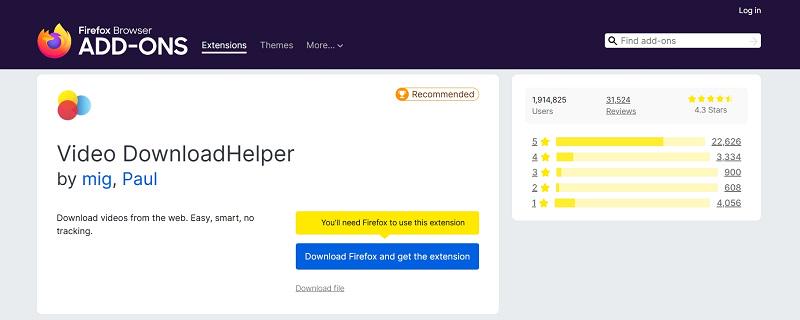
Video DownloadHelper is one of the most popular and trusted YouTube downloader extensions for Chrome. It stands out for its ability to support a wide range of video formats and online platforms, including YouTube, Facebook, Vimeo, Dailymotion, etc. Its batch downloading function makes it the first choice for most video lovers.
With it, users can easily download YouTube HD videos in MP4, WebM, FLV and other formats for free. Please note that too many history files on your browser can slow down or even prevent Video DownloadHelper from running.
Pros:
- Supports various video formats and resolutions.
- Easy-to-use interface and intuitive browser icon.
- Allows batch downloading for multiple videos.
- Compatible with multiple video streaming platforms.
Cons:
- Limited features in the free version.
- Advanced features requires a paid version.
- Occasional compatibility issues with YouTube changes.
No 2. Video Downloader Professional
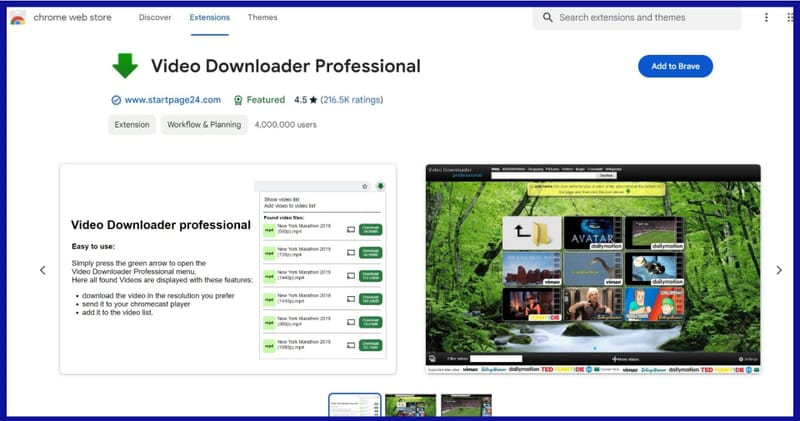
For a fast and easy solution, Video Downloader Professional is a good option. It supports many websites, including YouTube, and integrates seamlessly with Chrome. For YouTube, it typically provides a comprehensive list of available resolutions, from 144p all the way up to 4K. Even better, it allows you to download and convert YouTube to MP3 audios!
Its free version is quite capable if you don’t mind the ads and standard quality. To unlock ads and get highest-quality downloads, you can upgrade to its professional version (not free).
Pros:
- Simple and user-friendly interface.
- Supports downloading videos from various streaming sites.
- Provides direct links to various video and audio quality options.
- Fast download speeds with the ability to pause and resume downloads.
Cons:
- The free version includes advertisements.
- Access to the highest quality formats (like 4K) may require the pro version.
- Like all browser extensions, it may be affected by YouTube’s updates.
No 3. Addoncrop YouTube Video Downloader
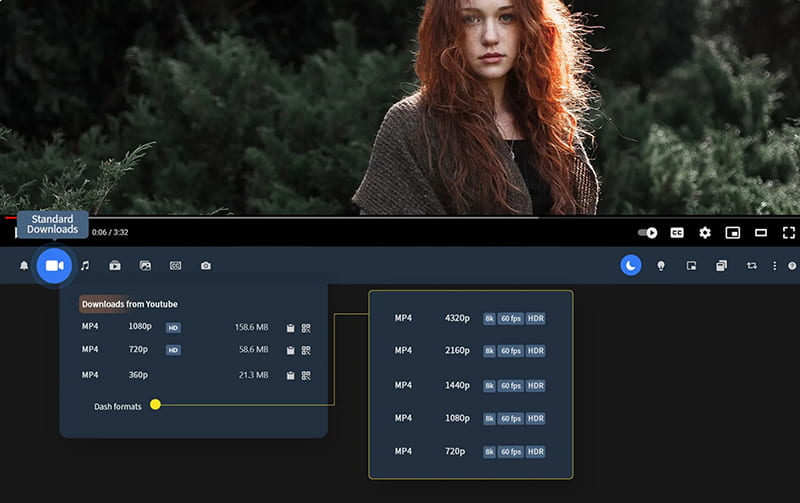
Addoncrop is another excellent YouTube video downloader extension for Chrome that provides a straightforward and efficient solution for downloading videos. It stands out for its wide array of supported formats like MP4, FLV, WebM, or MP3, etc. It’s lightweight, fast, and effective, making it an excellent choice for those who primarily download content from YouTube.
This extension adds a clean, intuitive download button directly underneath every YouTube video you watch, right alongside the “Like” and “Dislike” buttons. Clicking the button reveals a dropdown menu where you can select your preferred resolution (HD, Full HD, etc.)
Pros:
- Easy to install and set up.
- Offers one-click download for both video and audio.
- Supports high-quality downloads, including HD and 4K.
- Enables downloading from multiple streaming platforms.
Cons:
- Requires a manual update to ensure compatibility with newer YouTube changes.
- May not always work with encrypted YouTube videos or live streams.
- Lacks advanced features like batch downloading or a built-in library.
No 4. Tumblr Downloader
The next recommendation of YouTube downloader extension refers to Tumblr Downloader. Though primarily designed for downloading Tumblr content, this extension also works effectively for YouTube videos. It’s a versatile tool with an easy-to-use interface. It is regularly updated to maintain compatibility and successful downloads.
Pros:
- Clean, simple interface that is easy to understand.
- Supports high-resolution downloads from YouTube.
- No ads or pop-ups during the download process.
- Compatible with various video formats such as MP4, FLV, and AVI.
Cons:
- Doesn’t support downloading playlists or entire channels from YouTube.
- Limited features compared to other YouTube downloader extensions.
- May require frequent updates to stay compatible with YouTube changes.
No 5. Turbo Download Manager
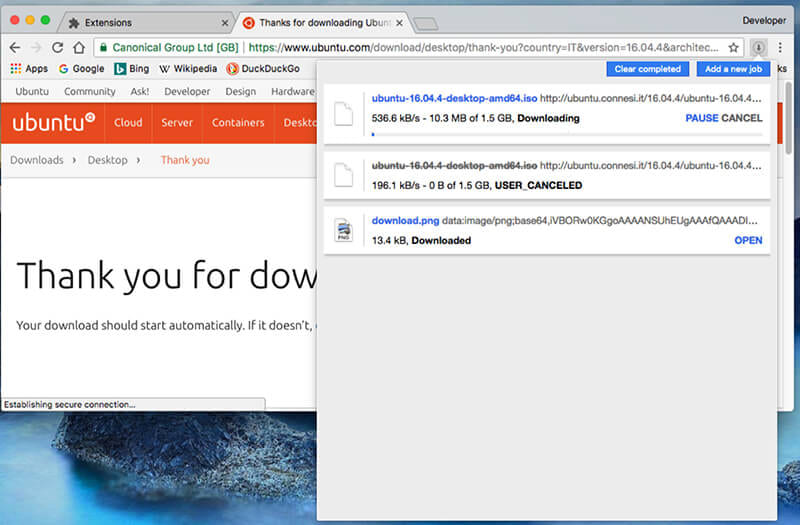
Turbo Download Manager is a reliable video downloader extension known for its speed and efficiency in handling large video downloads. While it functions as a capable YouTube downloader extension, its core strength is accelerating and managing all your browser downloads, not just videos. It’s especially useful for users who download high-quality videos YouTube videos from various sources.
Pros:
- Download YouTube videos for free.
- Extremely fast download speeds, even for large files.
- Supports a wide range of video and audio formats.
- Allows batch downloads and queue management.
Cons:
- Can sometimes be glitchy with newer YouTube updates.
- The interface is more complex due to its broader feature set.
- Video downloading is a feature within a larger manager, not its sole focus.
Best Alternatives to YouTube Downloader Extensions
While the YouTube downloader Chrome extensions offer a simple method to download YouTube videos for free, they have certain limitations such as compatibility issues, limited resolutions, slow download speed, and unstable performance. Moreover, YouTube might detect these extensions and ban you from downloading videos. So, in this part, we will introduce you the best YouTube downloader extension alternatives, that is professional desktop software YouTube downloader.
# 4kFinder Video Downloader
4kFinder Video Downloader is a powerful and efficient desktop application designed specifically for downloading online videos and music from over 1000 sites, including YouTube, YouTube Music, Vimeo, Vevo, SoundCloud, OnlyFans, Tub8, Twitter, TikTok, etc. It transcends the capabilities of any YouTube downloader extension by offering unparalleled download quality, 50X faster speed, and 100% success rate.
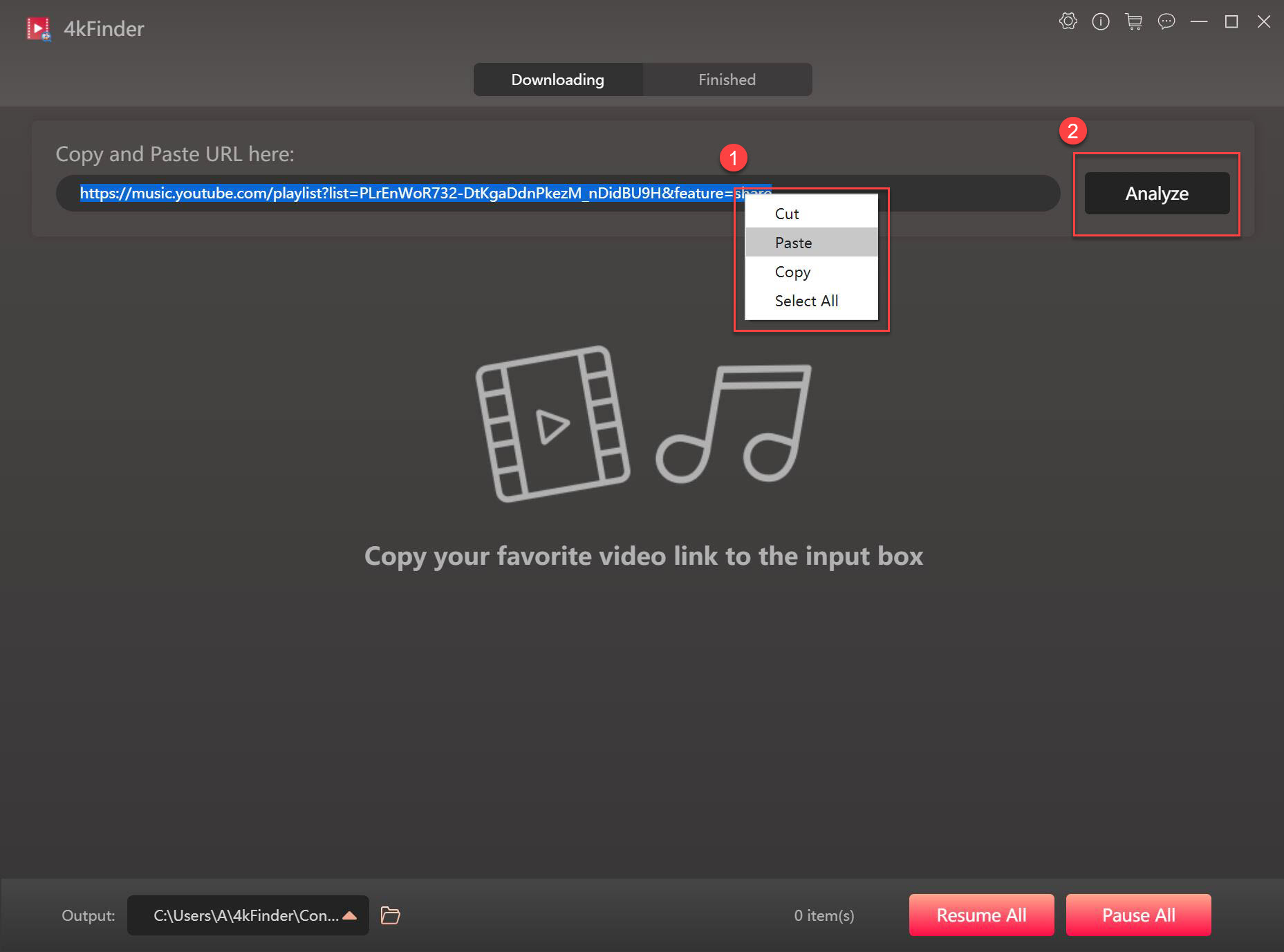
Unlike Chrome extensions that may be blocked by YouTube, 4kFinder uses a straightforward way to grab video content – simple copy&paste URLs. Better still, it supports to download any content from YouTube to your computer, from movies, MVs, live streams, 3D 360 & VR180 videos, to entire playlists, Channels, etc. It save the YouTube videos MP4/MOV/WebM in 720p, 1080p, 2K, 4K, or even 8K resolutions to enhance your offline viewing experience!
The steps of downloading YouTube videos are quite easy.
Step 1. Open 4kFinder and paste the YouTube URL, click “Analyze” button.
Step 2. Choose your preferred video quality from the options available.
Step 3. Click the “Download” button to begin the process!
Pros:
- Simple and clean interface, no ads or plug-in.
- Supports 1,000+ streaming video websites.
- Supports high-resolution downloads: 8K/4K/HD.
- Download YouTube videos to MP4, MOV, WebM or MP3.
- Download YouTube videos with subtitles kept.
- Batch download multiple videos or entire playlists, channels.
- Download unlimited YouTube videos to PC/Mac at 50X.
- Requires no YouTube Premium, no YouTube app, no YouTube account.
Cons:
- Requires an extra installation.
- The free version only lets you download 5 YouTube videos for free.
# iMovieTool Video Downloader
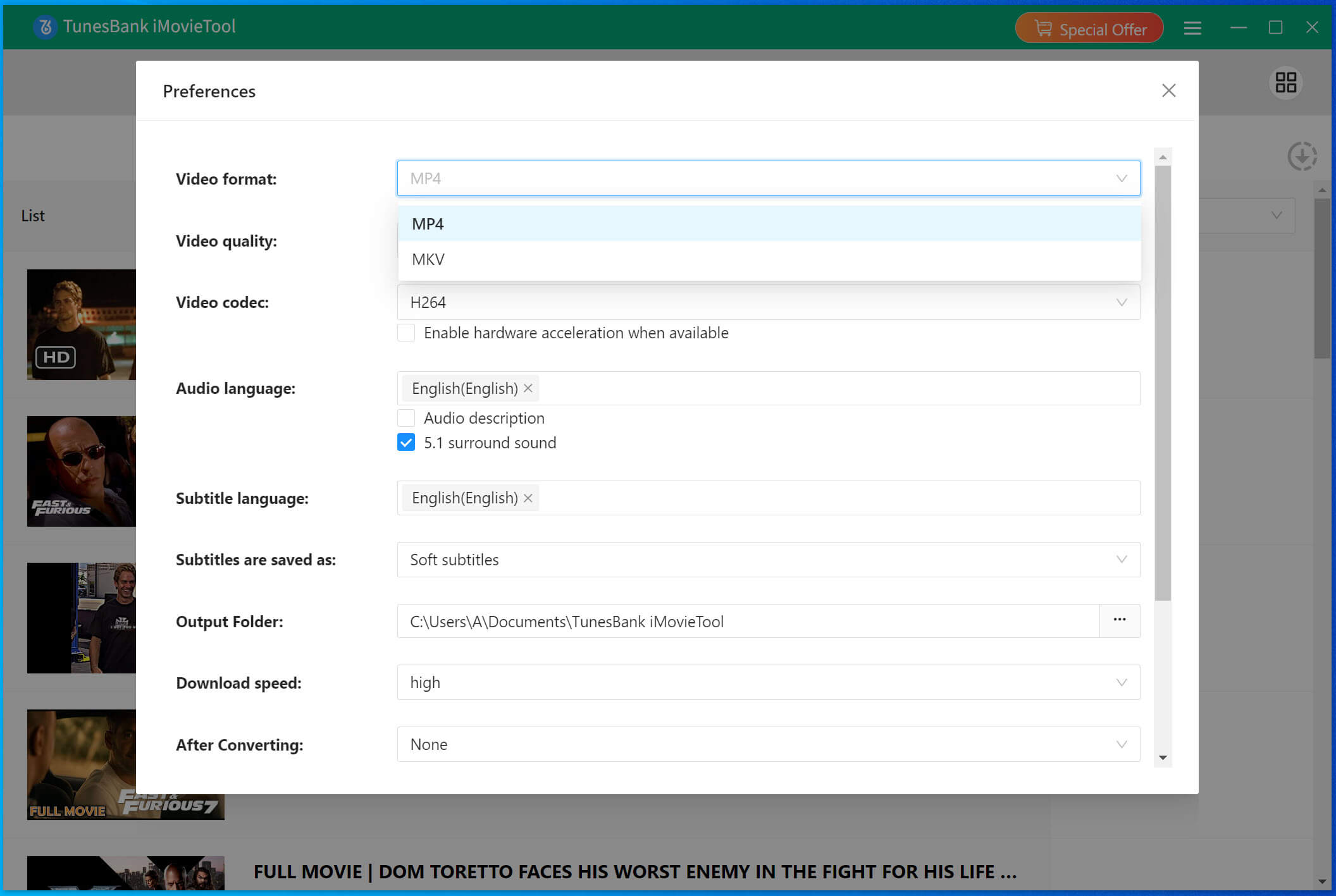
iMovieTool Video Downloader is another excellent alternative to Chrome extensions for downloading YouTube videos. It offers a fast, efficient, and feature-rich solution for downloading videos from YouTube and other OTT platforms. It has the ability to download YouTube videos in MP4/MKV format with the original audio track (AAC 5.1 or AC3 5.1 when available) and subtitles.
Compared to above YouTube downloader extensions and 4kFinder, iMovieTool has embedded the official web players inside the program, making it easy to browse, search, stream and download online videos. Only in a few clicks, you can quickly get HD YouTube videos on your local folder.
Simple Steps:
Step 1. Install and launch iMovieTool. Select YouTube and login to your account.
Step 2. Search for the video you want to download by using name or URL.
Step 3. Click “Gear” icon to select video format, quality, audio and subtitle.
Step 4. Click the “Download” button to download video from YouTube to your computer.
Pros:
- Built-in browser integration for a seamless experience.
- Supports YouTube, Netflix, Amazon Prime, Hulu, Max, Disney+, Facebook, etc.
- Supports downloading videos from YouTube in HD 1080p.
- Automatically skips ads and requires no Premium account.
- Allows the download of entire TV shows from YouTube Movie.
- Save audios and subtitles with multiple languages.
Cons:
- Limited function in the free trial version.
- You need to log in to your YouTube account in the software.
Comparison of Best YouTube Downloader Chrome Extensions
Earlier, we introduced the best YouTube Downloader Chrome extensions and software one by one. With so many options, you may have no idea. To help you save time and pick the best ideal, here is a comparison table on these options.
| Tools | Supported Platform | Output Formats | Output Quality | Speed | Batch Download | Subtitles download | Ad-free | Price |
| Video DownloadHelper | YouTube + several platforms | MP4, FLV, WebM | HD, 4K | Moderate | ✔ | ✔ | ✔ | Free version offers basic features |
| Video Downloader Professional | YouTube + several platforms | MP4, MP3, and others | SD, HD, 4K | Moderate | ✔ | ✘ | ✘ | Free |
| Addoncrop YouTube Video Downloader | YouTube + several platforms | MP4, FLV, WebM, and others | HD, Full HD | Moderate | ✘ | ✔ | ✔ | Free version offers basic features |
| Tumblr Downloader | YouTube + several platforms | MP4, FLV, AVI | SD, HD | Slow | ✘ | ✘ | ✔ | Free |
| Turbo Download Manager | YouTube + several platforms | MP4, FLV, WebM | HD, Full HD | Slow | ✔ | ✘ | ✔ | Free |
| 4kFinder Video Downloader | YouTube, YouTube Music & 1000+ sites | MP4, MOV, WebM, MP3 | 8K, 4K, 2K, HD, 320kbps | Super faster | ✔ | ✔ | ✔ | Free trial |
| iMovieTool Video Downloader | YouTube, Netflix, Amazon Prime Hulu, etc. | MP4, MOV | HD 720p, 1080p | Super faster | ✔ | ✔ | ✔ | Free trial |
As you can see, these two dedicated YouTube downloader software (4kFinder & iMovieTool) stand out as a top choice for YouTube lovers, offering reliable, ad-free, efficient and high-quality downloads. Other YouTube Downloader Chrome extensions only provide you with basic downloading features. Of course, they are also worth considering if you don’t mind.
FAQs About YouTube Downloader Chrome Extensions
Is it Safe to Use a YouTube Downloader Chrome Extension?
Yes, it’s generally safe to use YouTube downloader Chrome extensions as long as you choose reputable extensions. Ensure the extension has positive user reviews and avoid downloading from suspicious sources.
How Can I Legally download YouTube Videos for Free?
It is legal to download the YouTube videos for personal use and playback. The both YouTube downloader extensions and YouTube downloader software introduced let you download YouTube videos for free.
Can I Transfer the Downloaded YouTube Videos to a USB Drive?
Yes, once the YouTube video is downloaded to your computer’s hard drive as MP4 file, you can easily transfer it to a USB drive from local folder. Simply copy the file and paste it onto your USB device.
Final Words
In conclusion, YouTube downloader Chrome extensions offer fantastic convenience and quick access for everyday users who need to download videos directly from YouTube without extra installation and subscription fee. For those who demand the highest quality, batch downloading capabilities, stability and reliability, desktop software like 4kFinder and iMovieTool are unquestionably the superior choices. They overcome the limitations of browser extensions, providing robust performance and more advanced features than YouTube downloader extensions. These software offer a free trial version, choose the option that best fits your needs, and enjoy hassle-free YouTube video downloads in 2025!