
 Download Netflix videos to MP4 or MKV format in 1080P Full HD resolution.
 English
 Arabic
 Chinese (Simplified)
 Chinese (Traditional)
 Croatian
 Czech
Czech Danish
 Dutch
Dutch Finnish
 French
 German
 Greek
Greek Hebrew
 Hindi
Hindi Indonesian
 Italian
 Japanese
 Korean
 Malay
Malay Norwegian
 Polish
 Portuguese
 Russian
 Slovenian
 Spanish
 Swedish
 Thai
Thai Turkish
 Ukrainian
 Vietnamese


Do you looking for the best YouTube Music downloader to download YouTube Music for offline listeing? Here, we will introduct 7 best YouTube Music downloaders, and you can also learn how to download YouTube Music and music videos to MP3, so that you can enjoy them on any devices offline.
When you listen to beautiful music in a YouTube video, you may want to download it for offline playback or use it as a BGM on the video project. However, YouTube does not provide an option to download music from YouTube or extract music from YouTube. Luckily, there are many desktop applications or online websites can strip audio files from YouTube into popular audio formats, such as MP3, M4A, etc.

In order to save your hassle, we have conducted research and compiled the top 7 Streaming Audio Downloaders/Rippers all of which can help you extract audio from YouTube videos and download them as MP3, M4A or other audio formats in high quality. Check this best YouTube Music Downloaders review, select the best one to get audios from YouTube for your device.
CONTENTS
- 1. 4kFinder YouTube Music Converter – Download YouTube Music to MP3HOT!
- 2. 4kFinder Video Downloader – Download YouTube Music Video to MP3
- 3. UkeySoft Screen Recorder – Record YouTube Music Videos to MP3
- 4. 4K Video Downloader – Download YouTube Music Video as MP3
- 5. TubeOffline Downloader – Download YouTube Music Video as MP3
- 6. Any Video Converter Free – Download YouTube Music Video to MP3
- 7. Y2Mate – Download YouTube Music Video as MP3
- Comparison of Top 7 YouTube Music Downloaders in 2025
1. 4kFinder YouTube Music Converter – Download YouTube Music to MP3NEW!
4kFinder YouTube Music Converter is an advanced software tool that facilitates the conversion of YouTube Music to MP3 with professional results. Its exclusive features enable the user to easily extract and download individual tracks, albums, or entire playlists from YouTube Music to MP3 in high quality. Moreover, the tool also supports other formats such as M4A, AAC, WAV, FLAC, and AIFF, and is capable of delivering blazing conversion speeds of up to 16x faster.
An added advantage of the 4kFinder YouTube Music Converter is its compatibility with both free and premium accounts of YouTube Music. This feature permits the user to download their favorite songs for offline listening without the need for the YouTube Music app. The software employs cutting-edge technology to directly save songs from YouTube Music onto your computer, enabling easy transfer and playback on any device, without any restrictions.
Top Features of 4kFinder YouTube Music Converter
Works with Both Free & Premium YouTube Music Accounts
Whether you’re using a free or paid YouTube Music account, this tool fully supports both, giving you access to download content without limitations.
Download Individual Tracks, Albums, and Playlists
You can easily download single songs, full albums, or entire playlists from YouTube Music, making it convenient to save your favorite music in one go.
Convert to Multiple High-Quality Audio Formats
Convert YouTube Music into various audio formats, including MP3, M4A, AAC, FLAC, WAV, and AIFF. Enjoy high-quality or even lossless audio based on your preferences.
Batch Conversion at 16x Speed
Save time with fast, batch conversion. You can convert multiple songs at once at up to 16 times the normal speed, making the process quick and efficient.
Keep Original ID3 Tags & Metadata
After conversion, the tool preserves important song details like title, artist, album, and genre, it’s perfect for keeping your music library organized.
Download and Save Music Permanently
Once downloaded, your music files are saved locally on your computer, so you can listen offline anytime—even if a track is removed from YouTube Music later.
Built-in YouTube Music Web Player
Browse, search, download, and play YouTube Music all in one place with the built-in web player. It offers a smooth, all-in-one experience without switching between apps or browsers.
Works on Both Windows and Mac
Fully compatible with both Windows and macOS, so you can enjoy all features no matter which operating system you use.
Tutorial: How to Download and Convert YouTube Music to MP3
Step 1. Launch & Login Your Music Account
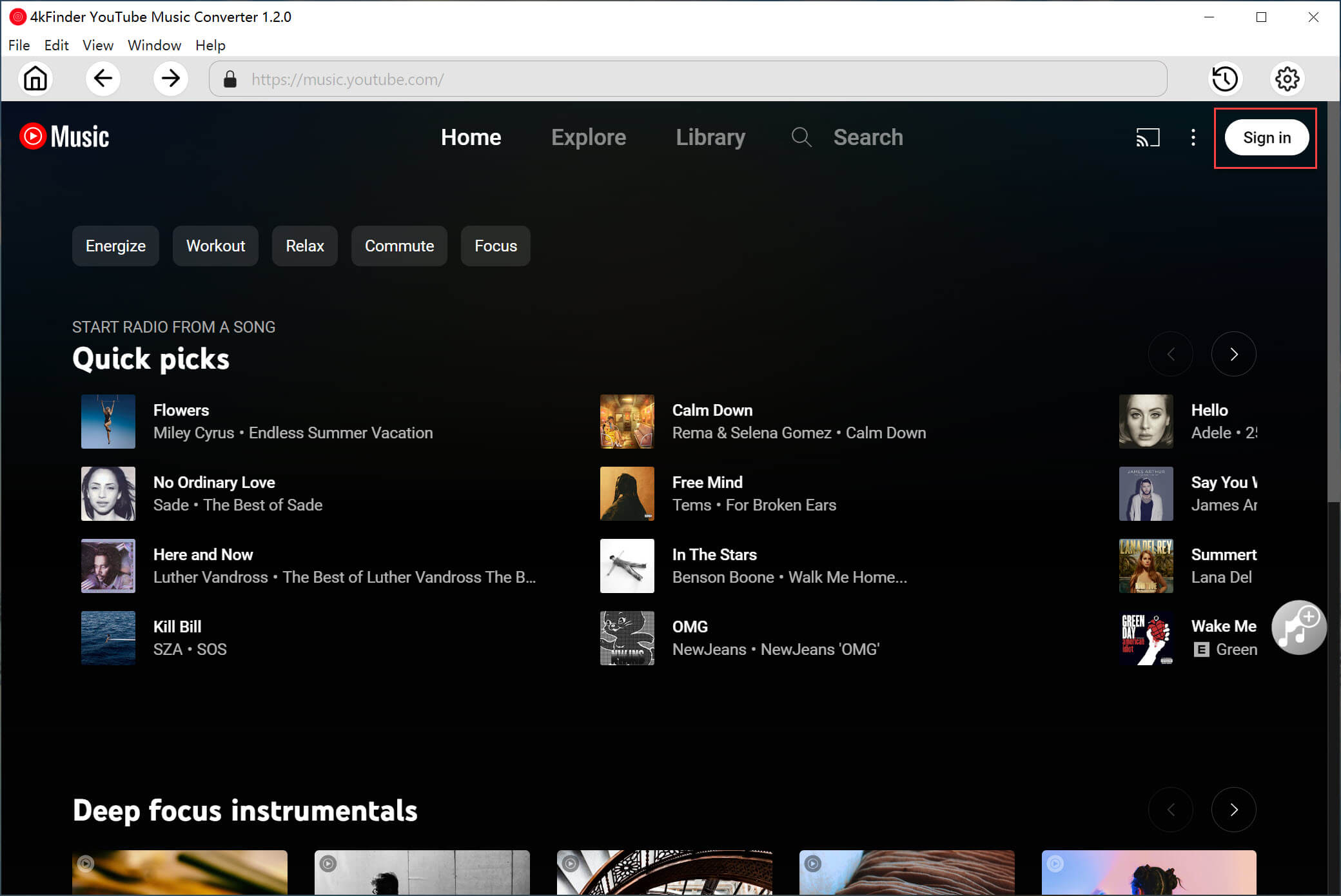
After installing the 4kFinder YouTube Music Converter on your computer, launch the program and click on the “SIGN IN” button to begin. You’ll be prompted to log in to your YouTube Music account, whether it’s the Free or Premium version, to get started with downloading your favorite tracks, albums, and playlists.
Step 2. Choose MP3 Output Format
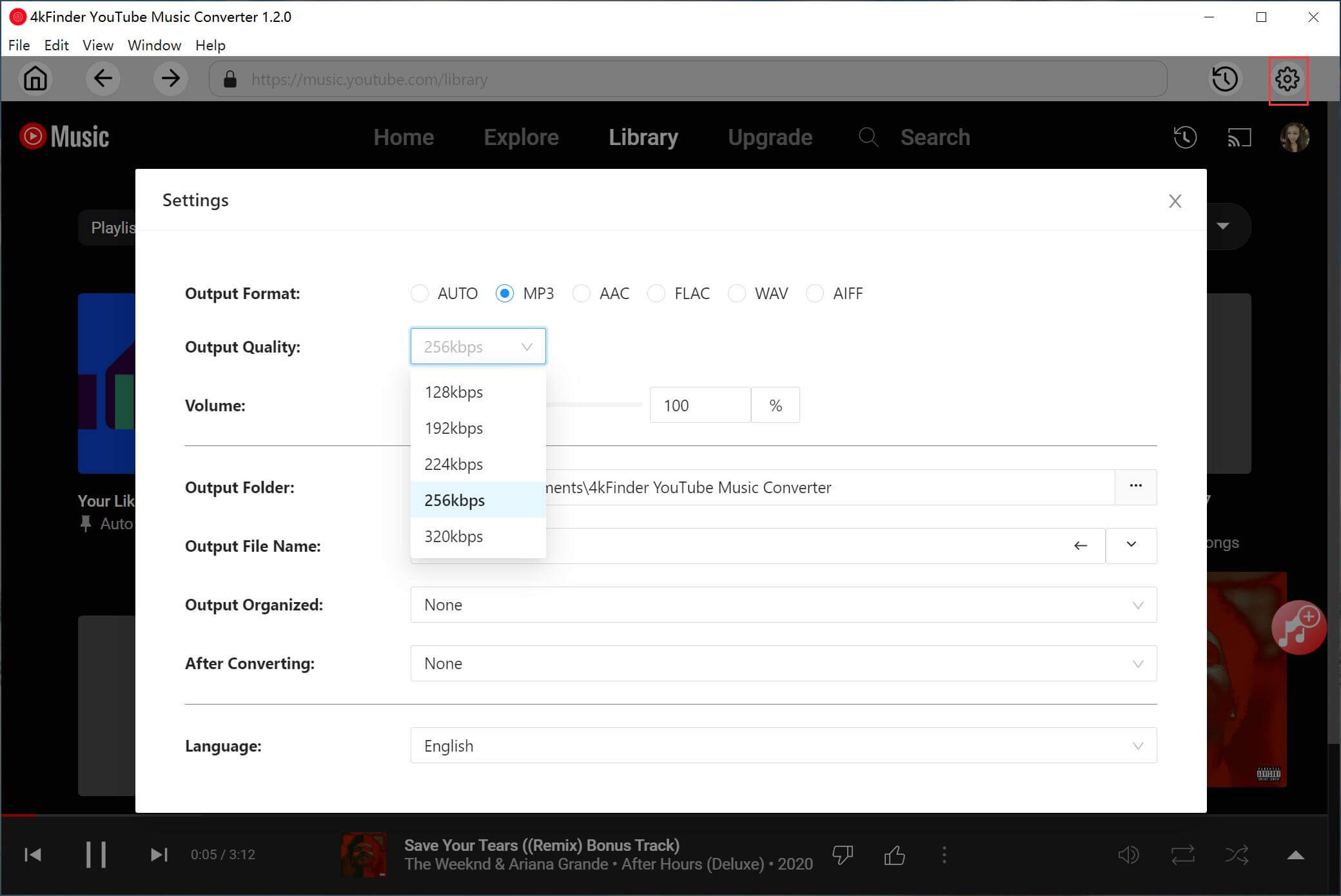
To change the output format of your downloaded tracks, simply click on the “Settings” option located in the upper corner of the program interface. This will open a settings window where you can choose from several available output formats including MP3, M4A, AAC, FLAC, WAV, and AIFF. To proceed, select the MP3 format from the list of options provided.
Step 3. Add YouTube Music Songs/Albums/Playlists
The software features a powerful built-in YouTube Music Web Player that allows you to easily search, stream, and add songs directly from the platform.
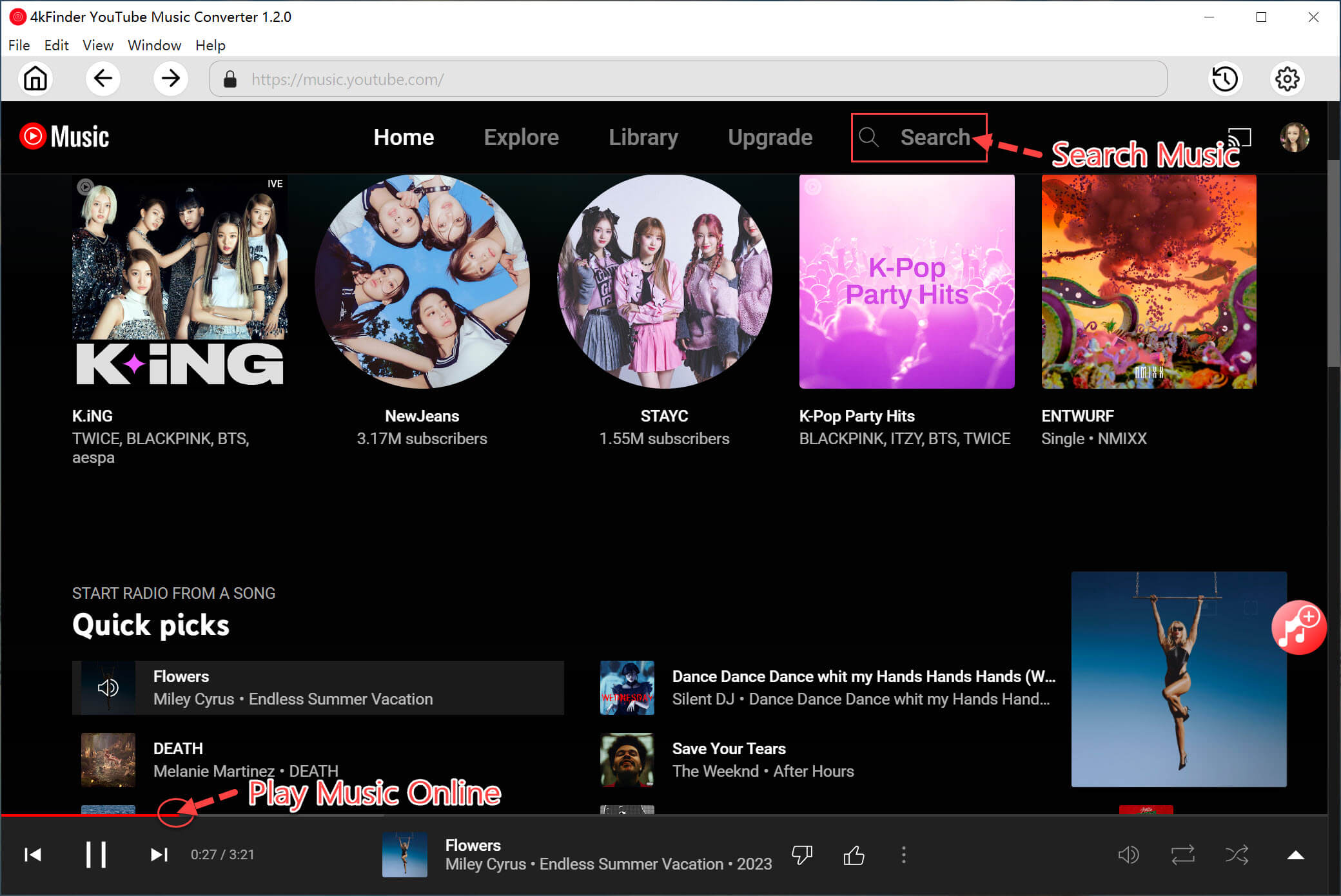
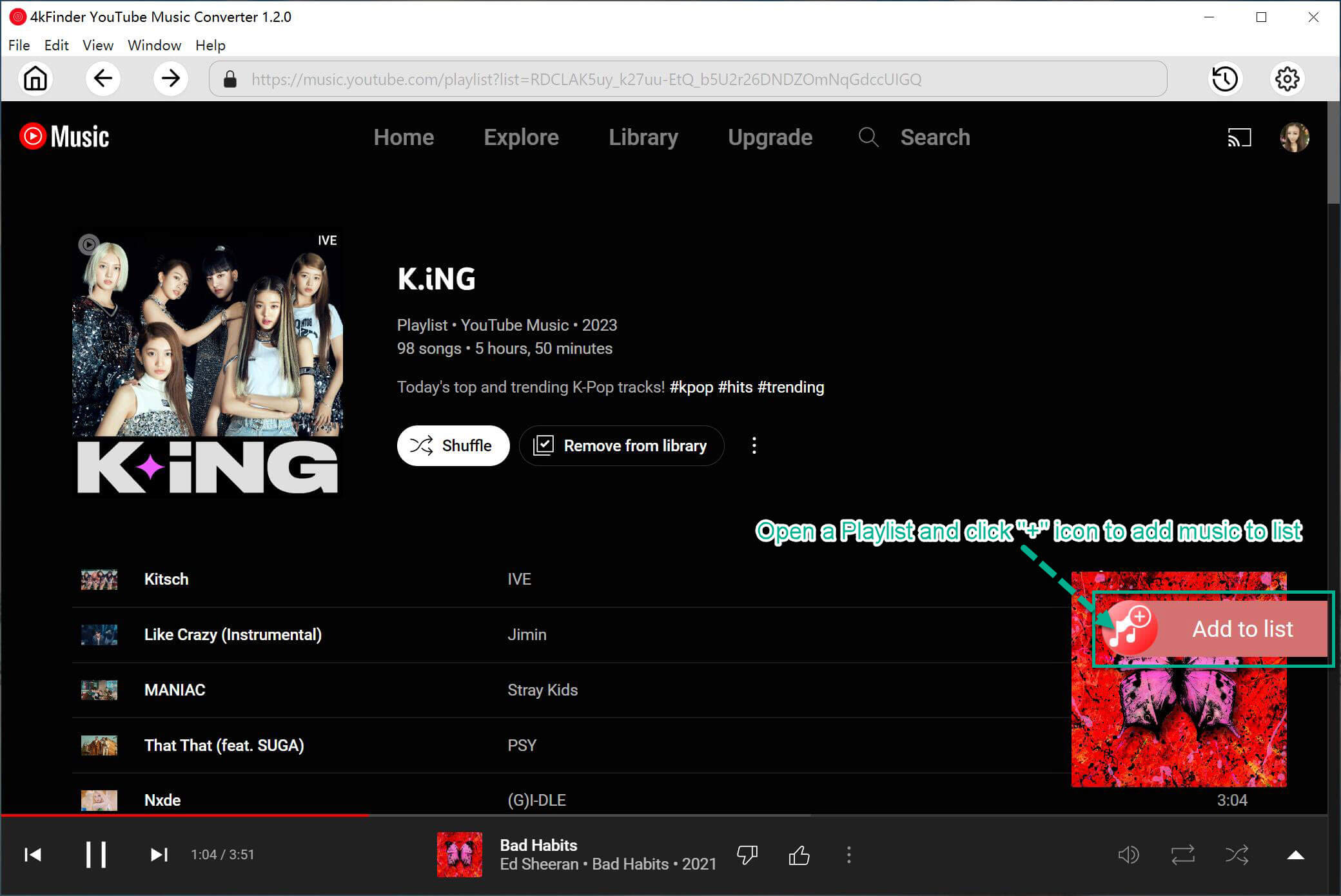
Simply open the desired item and click on the red “+” icon to add songs, albums, or playlists to the list. This will enable you to convert the selected items in any format you desire.
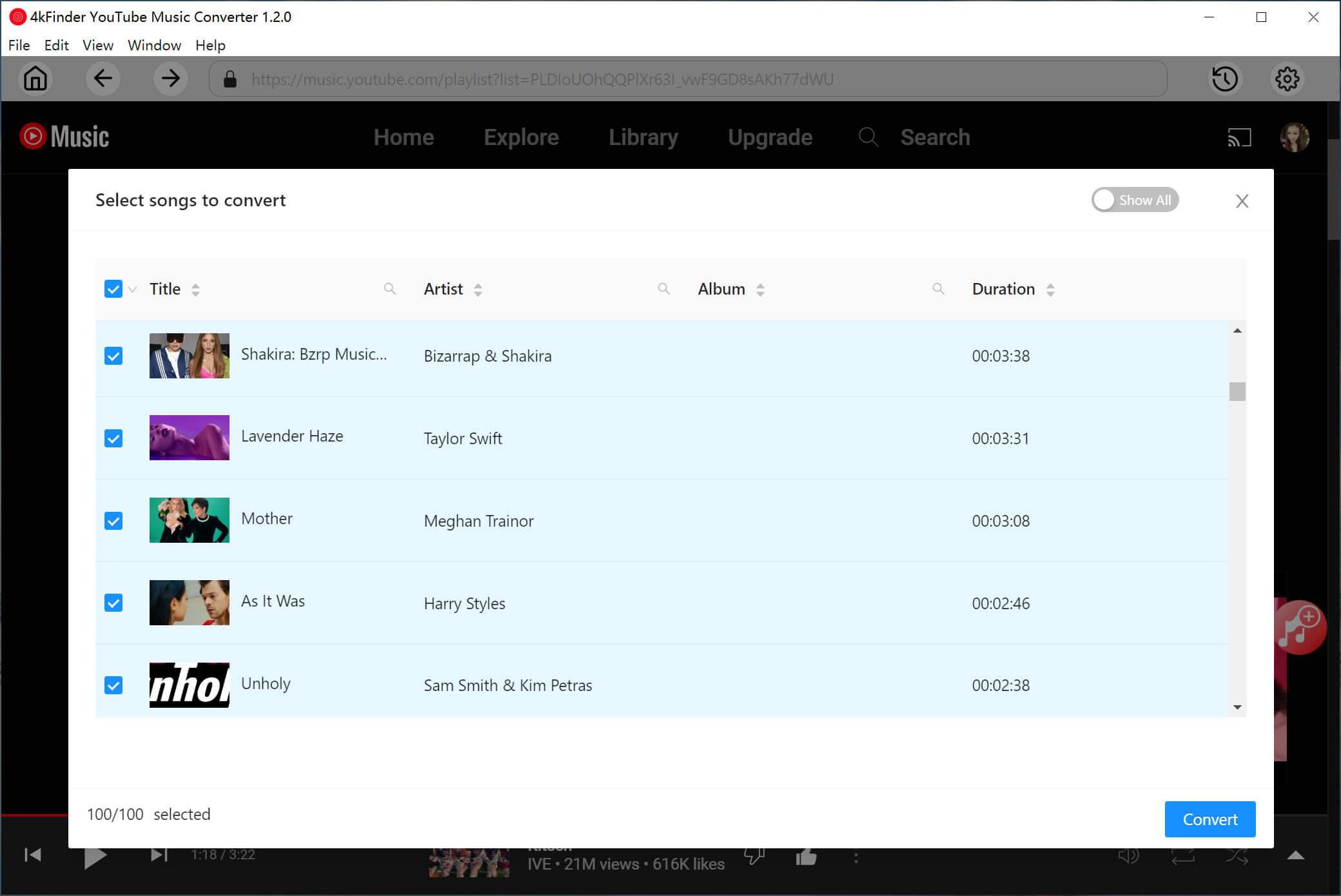
Step 4. Select YouTube Music Songs
The conversion panel will automatically populate with all the songs included in the selected album or playlist. To exclude any unwanted tracks from the conversion process, simply unselect them as desired.
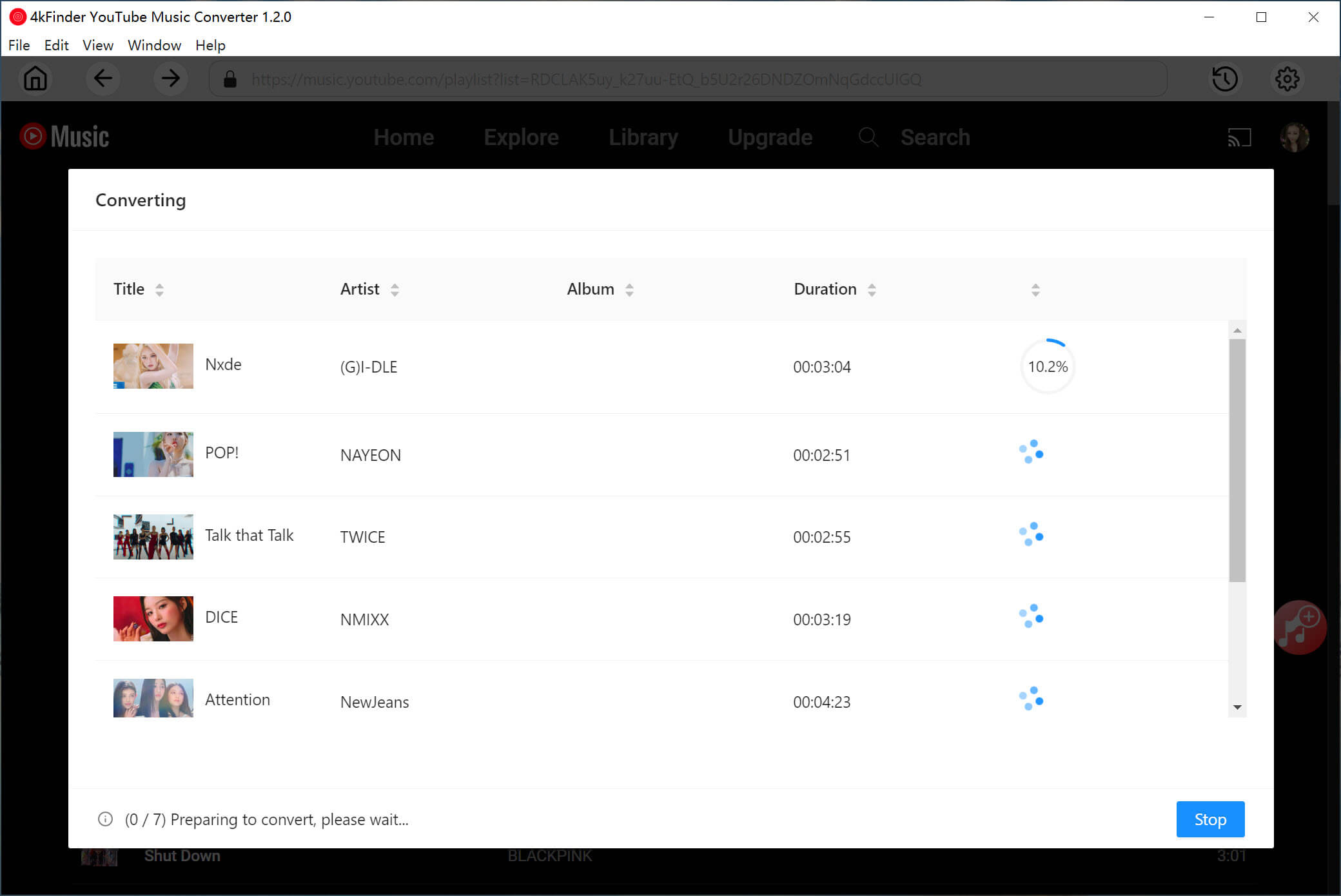
Step 5. Start to Download YouTube Music to MP3
After choosing the songs you want to convert, just click the “Convert” button to start the download process and convert your selected YouTube Music tracks into MP3 format.
Step 6. View the Converted Songs
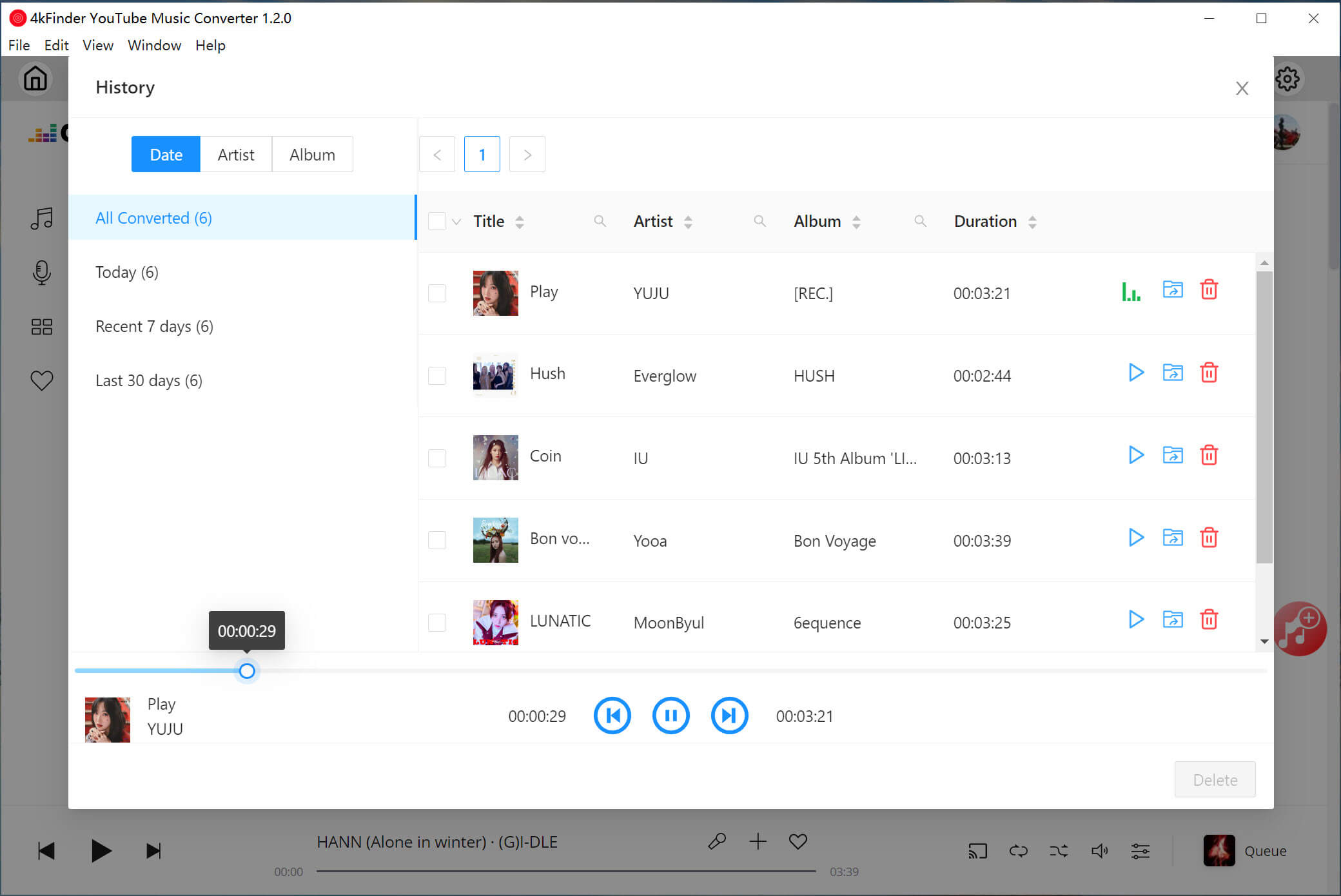
After the conversion is complete, you can access your converted YouTube music by navigating to the “History” section. From there, you can sort your converted songs by Date, Artist, or Album to locate them with ease. You can also click on the blue folder icon to quickly navigate to the output files for your converted YouTube music.
Pros
- Extract & download YouTube Music songs/playlists/albums for free.
- Supports output MP3, M4A, AAC, FLAC, WAV, AIFF.
- User-friendly interface, easy to use.
- Keep lossless audio quality and high quality output.
- Comes with built-in YouTube Misc web player without the need for extra apps.
- 10x faster conversion speed.
- Batch conversion.
- Keep ID3 information.
- Highly compatible with the latest Windows 10 & MacOS.
Cons
- The software doesn’t have mobile app.
- The free trial version only converts the first 3 minutes of each song.
2. 4kFinder Video Downloader – Download YouTube Music Video to MP3
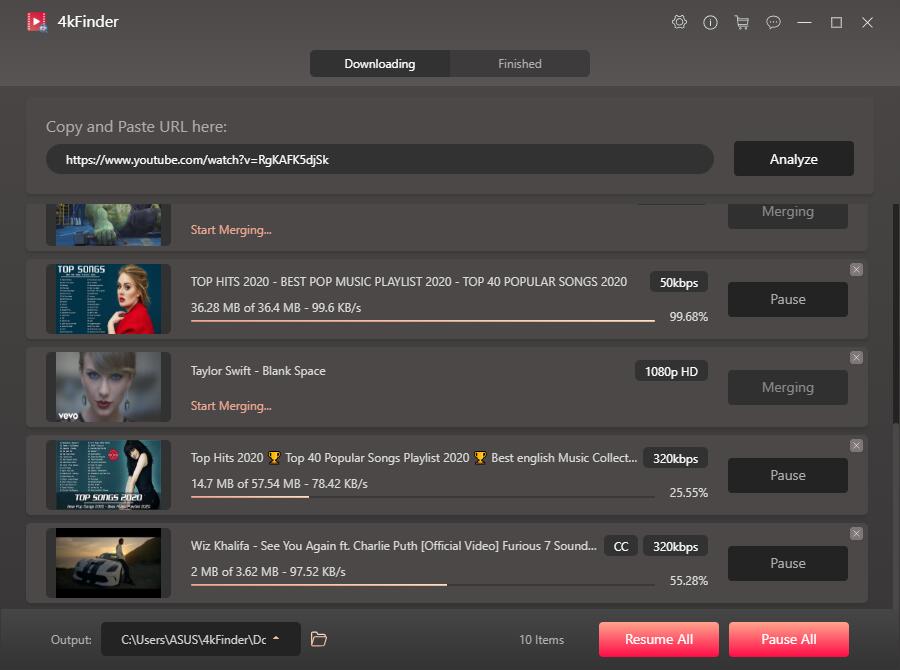
4kFinder Video Downloader is another great Online YouTube Downloaders and Rippers. Compared to 4kFinder YouTube Music Converter, this tools works for more sites. It not only enables you to free download music, videos and playlist from YouTube and 1000+ hot sites for free, but also lets you download YouTube videos to MP3 or MP4 format supported by most devices and players. With it, you can easily extract audio from YouTube video to MP3 kbps without any sound quality loss.
You can easily copy and paste the YouTube video URL to it, then 4kFinder program will automatically analyze and download them as MP3 music files only or video files, including 8K, 4K, HD 1080p, 720p or smaller size. In this way, you can watch YouTube video on any device, and enjoy YouTube music on MP3 player, iPod nano, etc.
How to Free Download YouTube Music with 4kFinder Video Downloader?
Step 1. Download, install and lunch 4kFinder Video Downloader on your Mac or Windows.
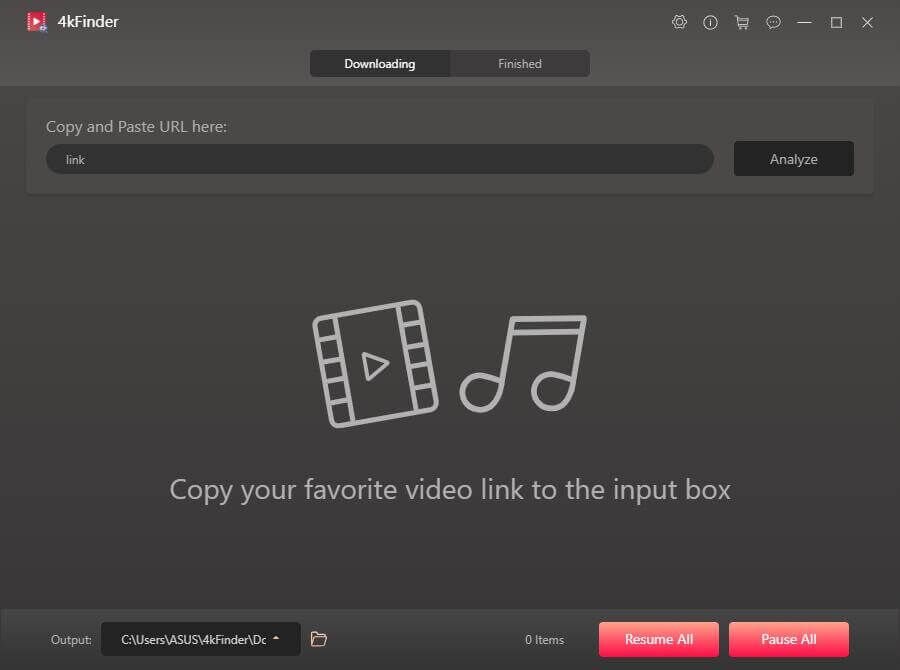
Step 2. Copy and paste your YouTube video URL to 4kFinder program, then tap “Analyze”.
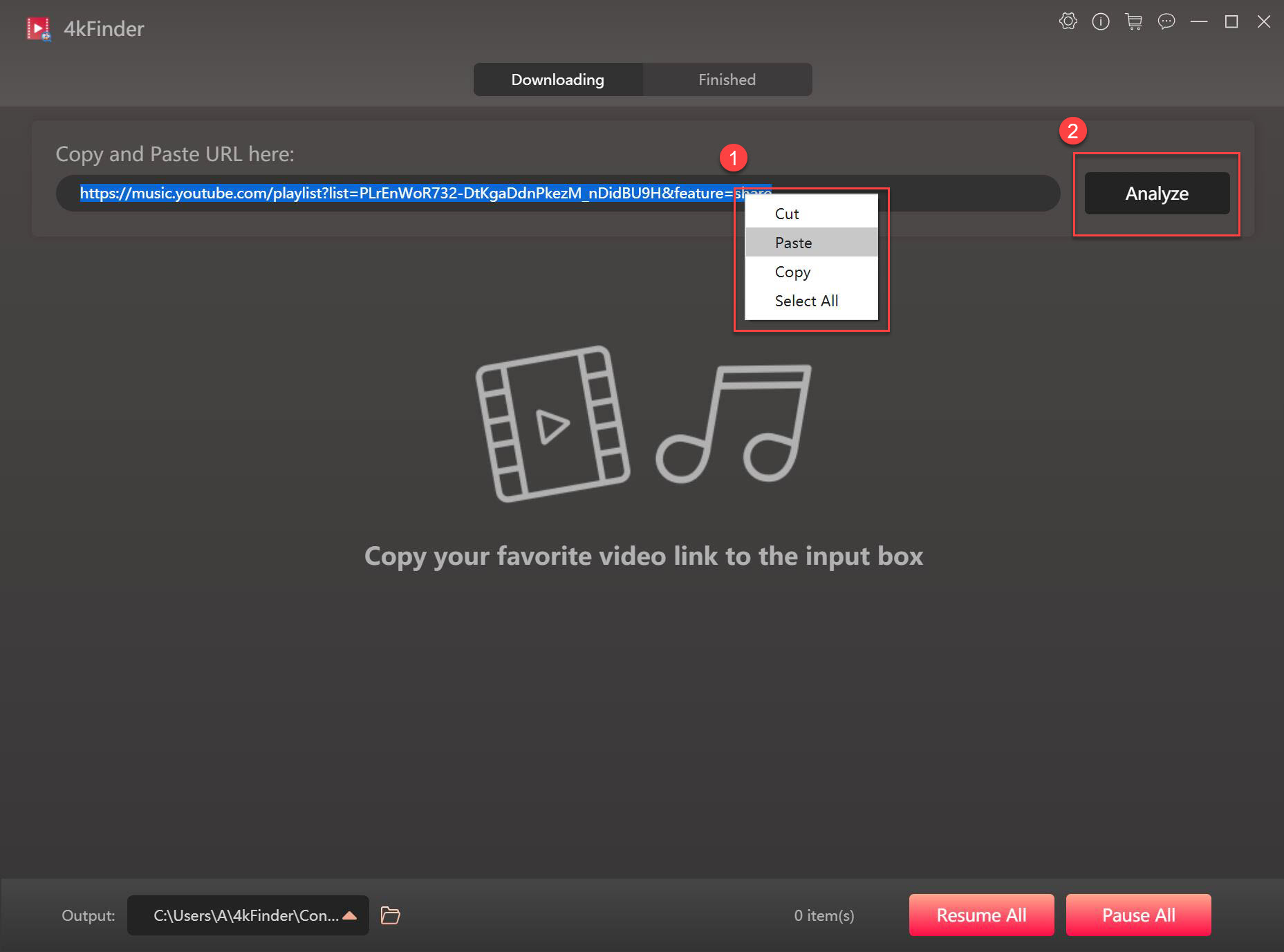
Step 3. In the pop-up window, select MP3 or MP4 format for the video.
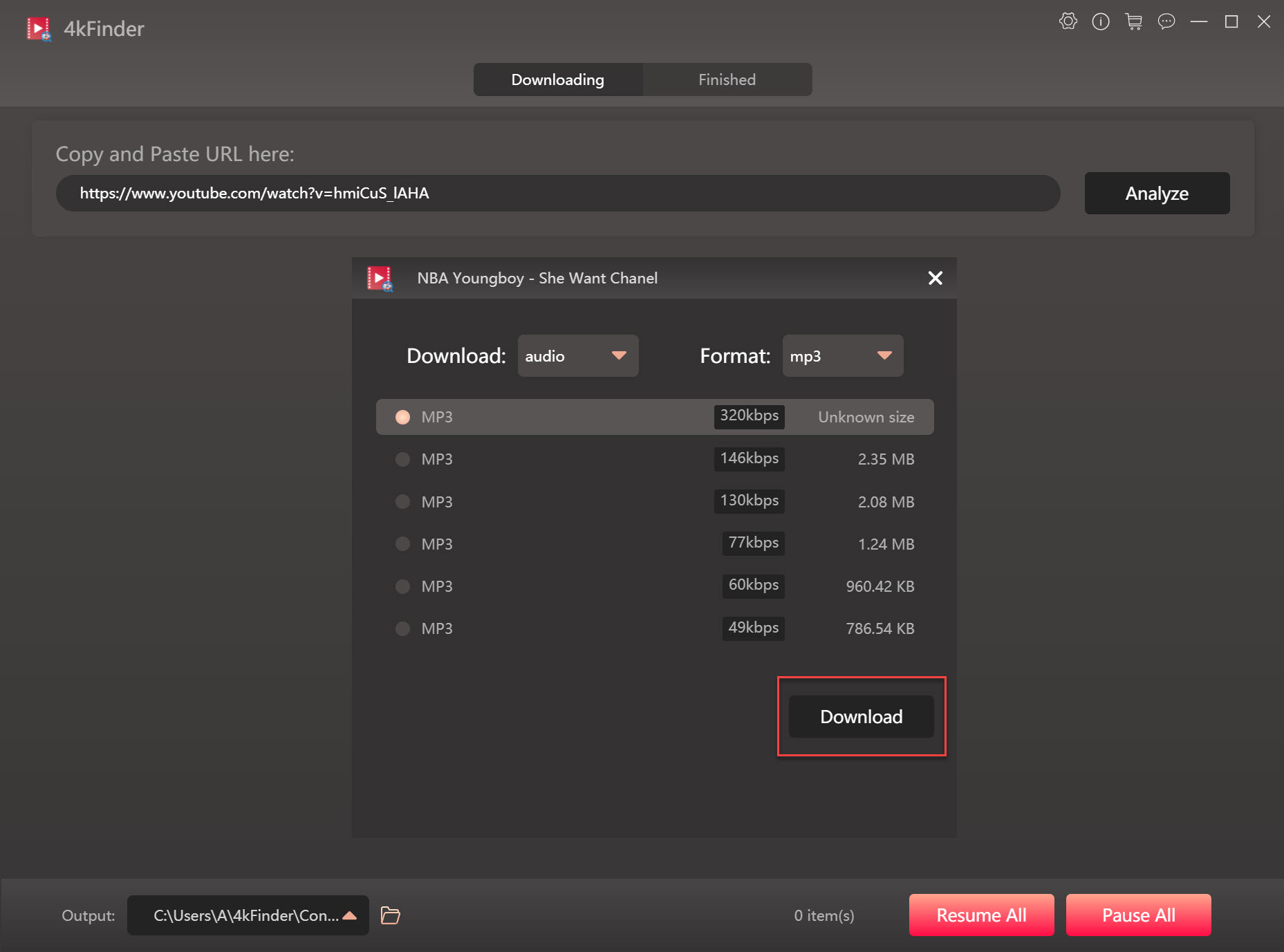
Step 4. Click the “Download” button to download YouTube video in MP3 or MP4 format.
Pros:
- Easy to use, no any ads, user-friendly interface.
- Supports to download music and videos from 1000+ hot sites for free.
- Free download music, videos, clips, tutorials, etc. from YouTube.
- Download the entire YouTube playlist, channels at once.
- Save YouTube video in MP3, M4A, MP4, WEBM, MOV formats.
- Download videos up to 8K resolution without quality loss.
- Extract audio from YouTube videos in MP3 320kbps.
- 6X faster download speed and lossless output quality.
- Highly compatible with the latest Windows 10 and macOS Catalina.
Cons:
- Not free, but its trial version lets you download 5 HD & UHD full videos in 8k, 4k, 2k, 1080p or 720p in 15 days.
- Only supports English and Japanese.
- Only works on on Windows and macOS.
3. UkeySoft Screen Recorder – Record YouTube Music Videos to MP3
When it comes to recording or extracting audio from YouTube videos, UkeySoft Screen Recorder for Mac is a good helper. It is a very simple free screen recorder that supports you to record audio from YouTube videos to MP3, M4A, AAC, WMA and other popular formats. In addition, its built-in audio/video editor function allows you to edit or trim the recorded YouTube video/audio according to your preferences.
How to Record Music from YouTube Videos with UkeySoft Screen Recorder?
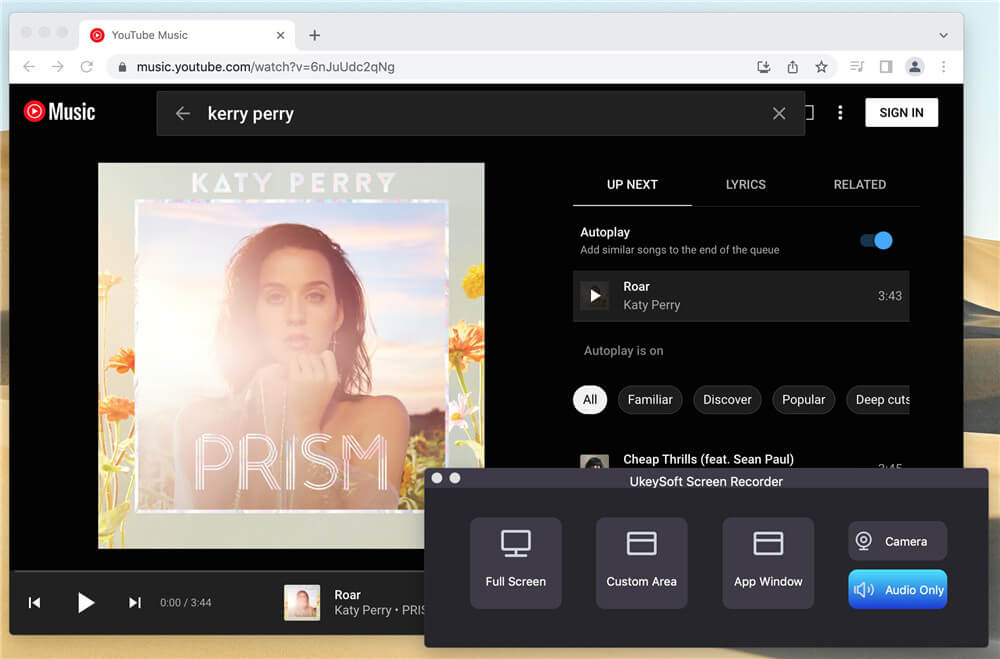
Step 1. Open YouTube Music Recorder
Download, install and launch UkeySoft Screen Recorder on your Mac computer. To record audio from a YouTube music video, click “Audio Recorder”.
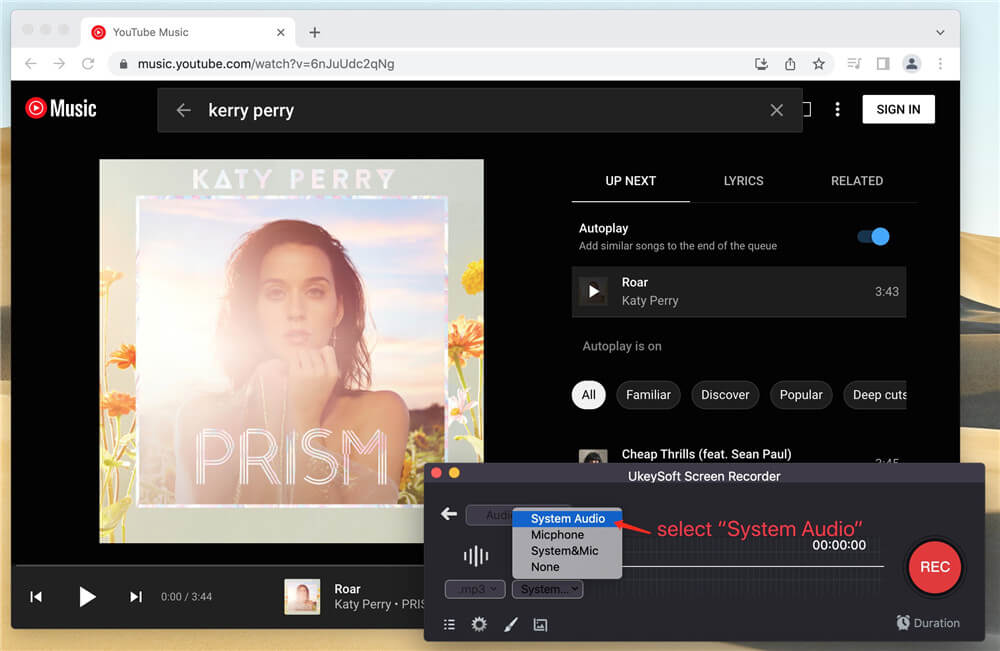
Step 2. Set System Sound
Turn on the “System Sound” switch and set the volume, then turn off the “Microphone”.
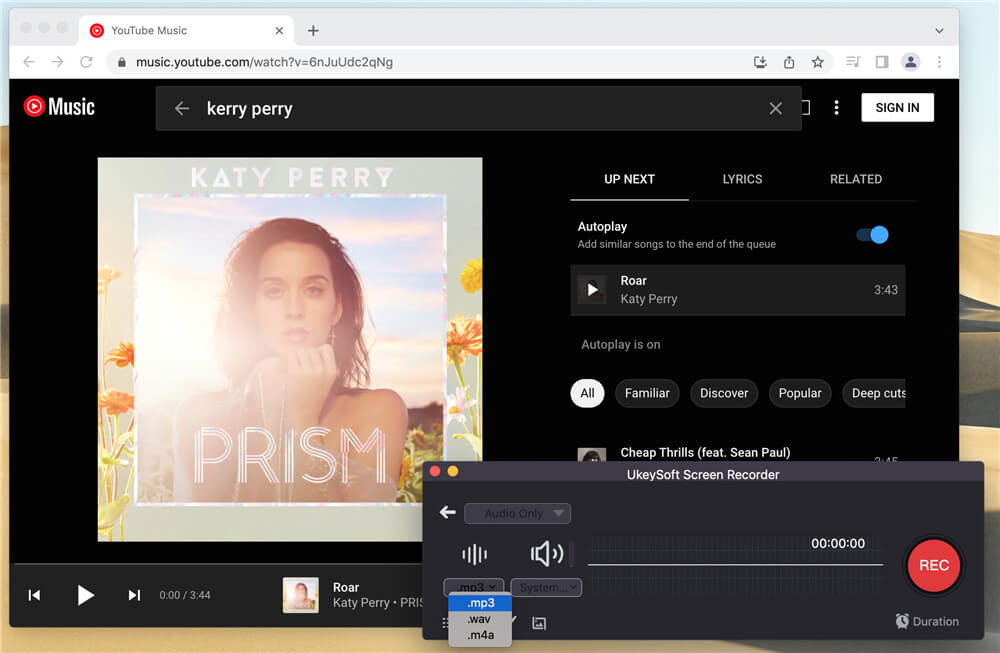
Step 3. Set Output Format
Under the format icon, select MP3 audio for YouTube Music.
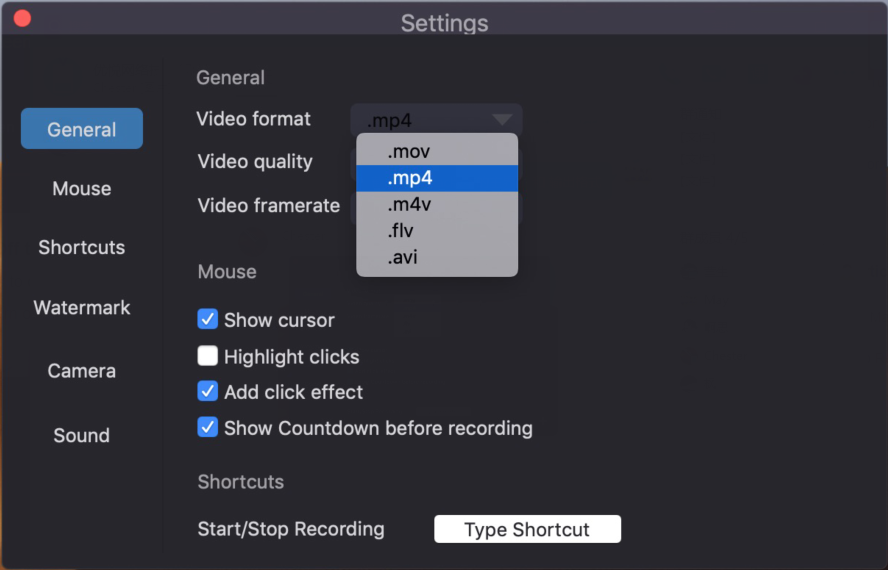
Tips: If you need to record YouTube music videos to MP4, please “Gear” (Settings) and then go to the “General” option to select the output format.
Step 4. Start Recording YouTube Music
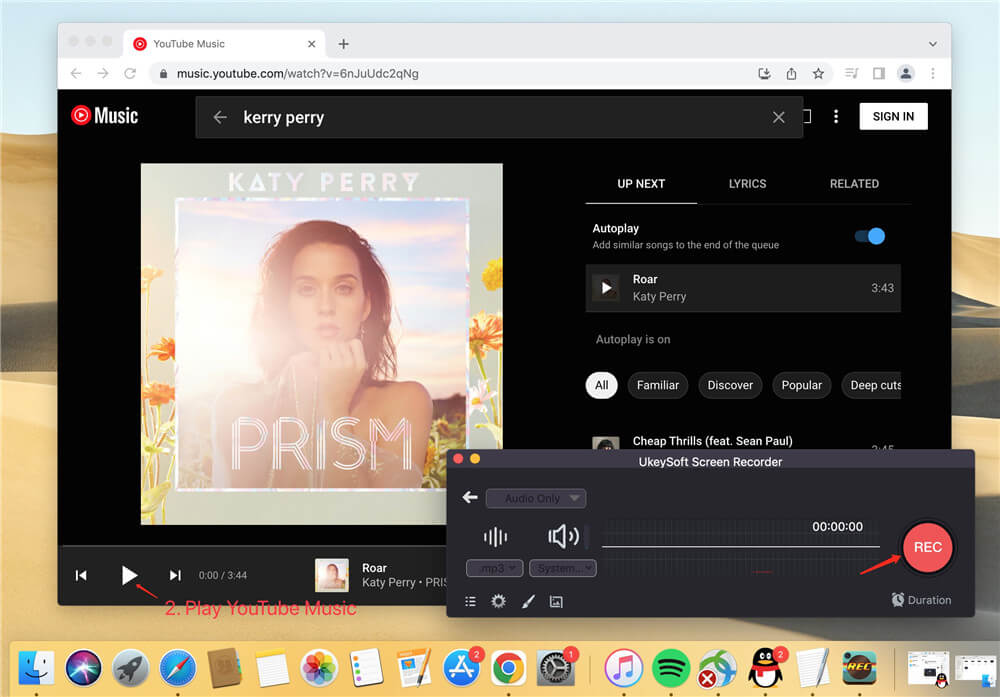
When you are ready, play the YouTube music video, and then click the “REC” button to start recording YouTube music. During this process, you can use the hotkey to stop recording the part you don’t like.
Step 5. View Output YouTube Music Files
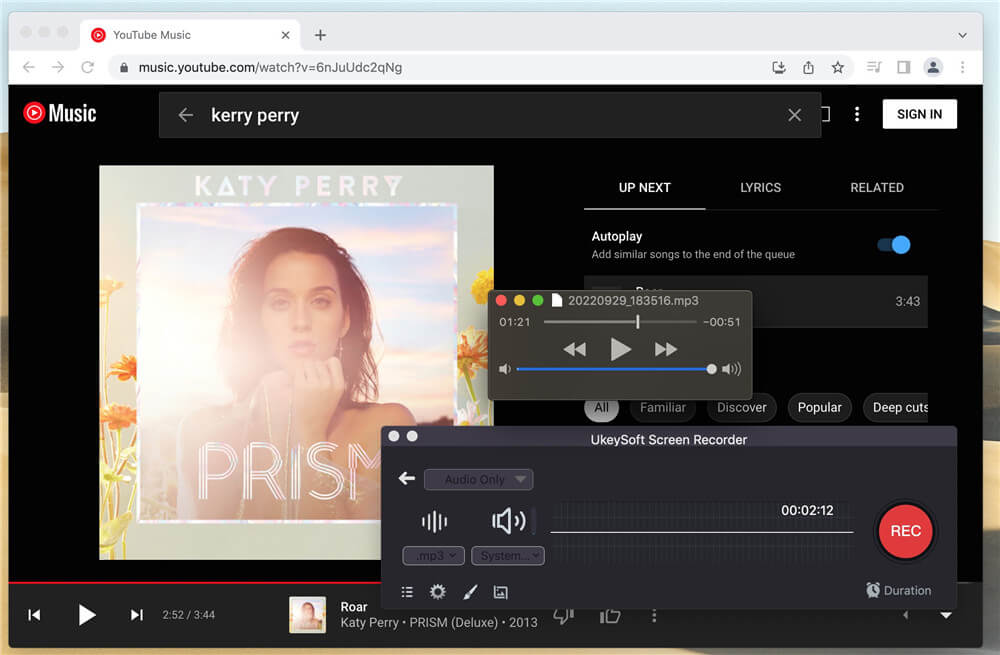
Once done, end your recording, and click “History” icon to find the output YouTube music files. You can play it with the built-in QuickTime Player on your Mac.
Pros:
- Record full screen, window, monitor, area, freehand drawing or scrolling.
- Lets you record any source that playing on your computer.
- Save YouTube videos and audios in popular formats.
- Also offers Microphone sound recording function.
- Freely edit the recorded YouTube video and audio.
Cons:
- The free version allows you to record YouTube audio and video for free, but with a watermark.
- It will take a long time when you need to record a long video/audio.
- Need to install the desktop app.
4. 4K Video Downloader – Download YouTube Music Video as MP3
To download music from YouTube, you can rely on 4K Video Downloader. 4K Video Downloader allows you to download music and videos from YouTube and other popular websites, such as Vevo, Facebook, Instagram, Vimeo, etc. It offers popular output formats like MP3, M4A, and OGG, so you can use it to extract audio from YouTube music video in different formats to be compatible with your music device.
How to Extract Audio from YouTube with 4K Video Downloader?
Step 1. Download and install 4K Video Downloader on your computer, then launch the program.
Step 2. Copy the video link on YouTube video, then click “Paste Link” on 4K Video Downloader.
Step 3. Next, select the target format for your preference, then click “Extract” to download songs from YouTube.
Pros:
- Easy to operate, no ads.
- Supports to download videos and audios from different sites.
- Lets you directly transfer the downloaded files to iTunes.
- Can download video up to 4k resolution.
- Works on on Windows, macOS and Linux.
Cons:
- No FTP settings are provided.
- Unable to set download speed.
- Doesn’t work on some popular sites.
- A paid software, its free version limits the number of downloads.
- Need to keep the window maximized, can’t minimize to the tray.
5. TubeOffline Downloader – Download YouTube Music Video as MP3
To download YouTube music video to MP3 files, TubeOffline Downloader is an anther alternative. It is a free online video download service website that enables you download audio and video from most popular websites, like YouTube, Vevo, Vimeo, etc. With it, you can easily download online video to MP3 audio files. Just open this website on your browser, and add the video URL to the bar, then you will be able to save your favorite videos from popular services.
How to Download YouTube Music Video as MP3 with TubeOffline Downloader?
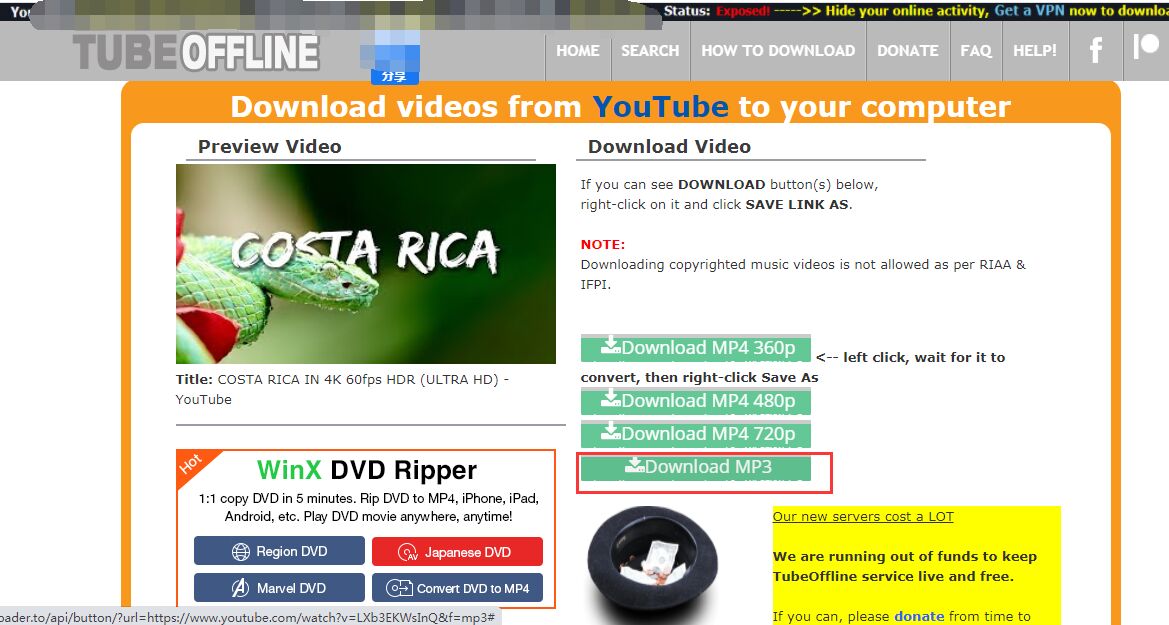
Step 1. Head to TubeOffline Downloader website and YouTube website on your browser.
Step 2. Copy the video link on YouTube, then paste the video link in the download box of TubeOffline page, and click “GET video”.
Step 3. Next, it will take you to a new page, select the MP3 format, and click the “Download MP3” option.
Pros:
- A free website.
- Easy to use.
- Can download online videos to MP4 or MP3 format.
- No need to install desktop applications, no need to register any account.
Cons:
- Fewer websites are supported.
- There are various advertisements on the page.
- Only download videos up to 720p, not 4k and 8k.
- There is no bitrate selection for downloading MP3 audio.
- It takes a long time to download videos online, the speed cannot be adjusted, sometimes there is no response when downloading.
6. Any Video Converter Free – Download YouTube Music Video to MP3
Any Video Converter Free is a well-known free tool for converting YouTube videos and audio. It lets you download music and videos from over 100 websites like YouTube, Facebook, Dailymotion, Vimeo, VEVO, Metacafe, and more. This open-source converter is safe, easy to use, and works on Windows. You can use it to save your favorite videos or songs in formats that play smoothly on different devices. It also comes with several helpful features and tools for both simple and batch conversions.
How to Use Any Video Converter Free to Download Music from YouTube
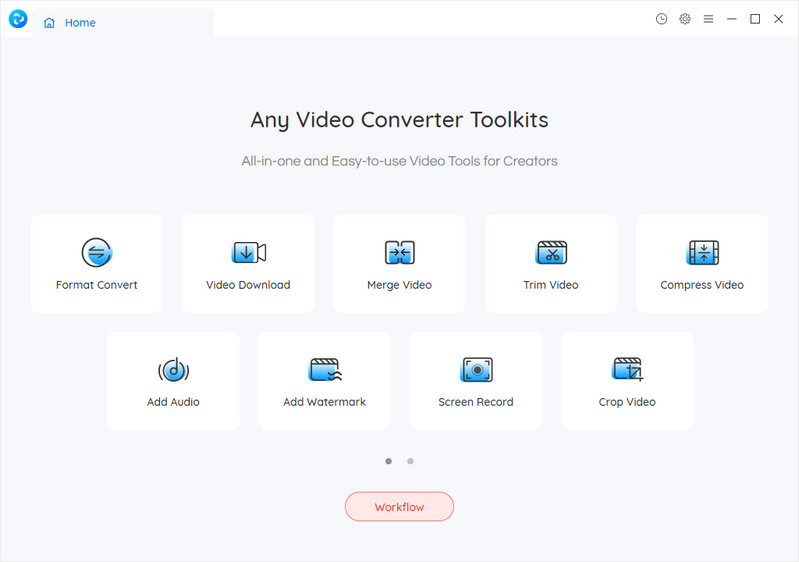
Step 1. Open Any Video Converter Free, then click on “Video Download.”
Step 2. Find the YouTube video you want to download, copy its URL, and paste it into the search box. You can paste multiple links if you want to download more than one video. After that, click “Analyse.”
Step 3. Under “Download Setting,” choose “Audio only.” In the Manual section, you can pick your preferred audio format (MP3, M4A, or OPUS) and set the audio quality.
Step 4. Once everything’s set, click “Start” to begin downloading the music.
Pros:
- Allows you to download music from YouTube.
- Supports downloads from 100+ websites.
- Lets you cut or trim videos into smaller parts.
- Combine multiple clips into a single video.
- Adjust audio levels and apply sound effects.
- Packed with useful features.
- Completely free to use.
Cons:
- Only works on Windows.
7. Y2Mate – Download YouTube Music Video as MP3
Y2Mate is a free online tool that lets you convert and download YouTube videos to MP3. You can use it directly from any web browser on your phone or computer. It supports quick downloads from popular sites like YouTube, Facebook, Dailymotion, Youku, and more, offering HD-quality MP4 and MP3 options. Using it is simple – just paste the video link into the search box, click Start, and you’ll see download options for both video and audio formats. Best of all, it’s completely free.
Note: Since it’s ad-supported, you may see pop-ups or banner ads when using the site. You’ll need to close them manually.
How to dDownload YouTube Music Video to MP3 with Y2Mate
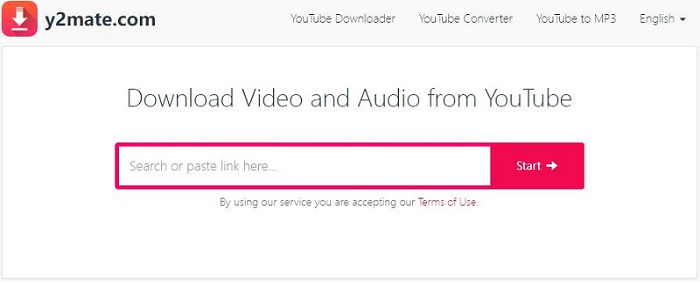
Step 1. Type the name of the video or paste its link into the search bar.
Step 2. Click Start to begin the conversion.
Step 3. Choose your preferred audio format, then click Download to save the file.
Pros:
- Easily convert and download YouTube music to MP3.
- No sign-up needed to start downloading.
- Supports downloads from sites like YouTube, Facebook, Dailymotion, and more.
- Offers unlimited free downloads.
- Compatible with all browsers on both mobile and desktop.
- Supports various audio and video formats.
Cons:
- Download speed can be slow at times.
- Pop-up ads can be annoying and must be closed manually.
- Doesn’t support batch downloads, you’ll need to convert videos one by one.
Comparison of Top 7 YouTube Music Downloaders in 2025
| OS | Input | Output Format | Quality | Speed | Batch Download | Price | |
|---|---|---|---|---|---|---|---|
| 4kFinder YouTube Music Converter | Windows & Mac | YouTube Music | MP3, M4A, AAC, WAV, FLAC, AIFF | Original Quality | 16X | Yes | $14.95/month |
| 4kFinder Video Downloader | Windows & Mac | YouTube Music & Videos | MP3, M4A | Original Quality | 6X | Yes | $14.95/month |
| UkeySoft Screen Recorder | Windows & Mac | YouTube Music & Videos | MP3, M4A, AAC, WMA | Original Quality | Real Time | No | $69.95/lifetime |
| 4K Video Downloader | Windows & Mac | YouTube Music & Videos | MP3, M4A, and OGG | Original Quality | Fast speed | Yes | $65/lifetime |
| TubeOffline Downloader | Web Browser | YouTube Music & Videos | MP3, MP4 | Original Quality | 1X | No | Free |
| Any Video Converter Free | Windows Only | YouTube Music & Videos | MP3, M4A | Original Quality | Fast speed | Yes | Free |
| Y2Mate | Web Browser | YouTube Music & Videos | MP3 | Original Quality | Fast speed | No | Free |
Conclusion
No matter which YouTube Music Downloader you choose among the top 7 best paid and free tools, you can freely extract music from YouTube and other popular websites, or download YouTube music to MP3 audios for offline playback on any device now. For me, 4kFinder YouTube Music Converter is the best choice for its easy-to-use, powerful functions, 10X faster download speed, lossless output quality, high compatibility. 4kFinder YouTube Music Converter is worth trying!

I am also writing to make you be aware of of the extraordinary discovery our daughter obtained reading through your webblog. She came to understand lots of details, which included what it is like to have an incredible helping spirit to make most people effortlessly learn chosen problematic topics. You actually exceeded her desires. Thanks for presenting those productive, trusted, informative and fun thoughts on that topic to Gloria.
Thanks for all of the hard work on this site. My mom enjoys setting aside time for investigations and it’s really easy to understand why. I learn all about the lively way you present priceless tactics by means of the website and as well invigorate participation from visitors on this subject matter and our own child has been becoming educated a great deal. Take advantage of the remaining portion of the year. You are performing a wonderful job.
I wish to express my appreciation to you for bailing me out of this issue. Just after looking through the world-wide-web and finding ideas which were not powerful, I believed my life was gone. Existing without the solutions to the difficulties you’ve resolved through this short post is a crucial case, as well as the kind which could have in a wrong way affected my entire career if I hadn’t noticed your web blog. Your primary understanding and kindness in controlling all things was important. I am not sure what I would’ve done if I hadn’t come across such a thing like this. I’m able to at this point relish my future. Thank you so much for the professional and amazing guide. I won’t think twice to refer your blog post to anyone who should have direction about this topic.
Thanks so much for providing individuals with such a splendid possiblity to read from here. It really is very fantastic and as well , packed with amusement for me personally and my office acquaintances to visit your web site particularly 3 times per week to study the new stuff you have. And indeed, we are certainly motivated concerning the unbelievable principles served by you. Certain 3 points in this post are certainly the most beneficial we’ve had.
I must show appreciation to this writer for bailing me out of this particular crisis. Right after searching throughout the internet and meeting thoughts that were not beneficial, I figured my entire life was gone. Existing minus the approaches to the problems you’ve solved all through your entire post is a crucial case, as well as the kind that could have in a negative way damaged my career if I hadn’t noticed your blog. Your own expertise and kindness in dealing with all the pieces was useful. I don’t know what I would have done if I hadn’t discovered such a point like this. It’s possible to at this point relish my future. Thank you so much for the expert and sensible guide. I won’t hesitate to recommend your site to any person who should get direction about this subject matter.
I useɗ to be recommended this blog by way of my cousin. I am now
not sure whether this submit is written viа him аs nobody else recognize sucһ desiցnated about my probⅼem.
You are incredible! Thanks!
I wish to express some thanks to you just for bailing me out of this particular circumstance. Just after surfing through the search engines and coming across principles which are not productive, I figured my life was over. Being alive without the answers to the problems you have resolved as a result of your entire blog post is a serious case, as well as the kind which may have negatively damaged my entire career if I had not noticed your web page. That know-how and kindness in taking care of every part was very useful. I’m not sure what I would’ve done if I had not come across such a solution like this. I can at this time look forward to my future. Thank you so much for the expert and result oriented help. I won’t hesitate to suggest your web blog to anybody who should get support about this subject matter.
My wife and i have been quite joyful that Ervin managed to finish off his preliminary research by way of the ideas he acquired in your weblog. It is now and again perplexing just to possibly be giving away guidance which many people have been making money from. We really keep in mind we’ve got the writer to give thanks to for that. The explanations you made, the straightforward site menu, the relationships you will give support to engender – it’s got many overwhelming, and it’s making our son in addition to us know that the concept is thrilling, which is highly pressing. Many thanks for the whole thing!
I actually wanted to write a quick remark in order to say thanks to you for these marvelous recommendations you are giving out at this website. My time intensive internet look up has finally been paid with reasonable ideas to talk about with my friends and classmates. I would point out that most of us visitors are truly fortunate to live in a great site with so many outstanding professionals with valuable tips. I feel extremely privileged to have discovered your web site and look forward to really more exciting minutes reading here. Thanks a lot again for everything.
I wanted to type a small remark so as to thank you for some of the pleasant suggestions you are giving out here. My time-consuming internet lookup has at the end been recognized with high-quality strategies to talk about with my two friends. I would admit that we site visitors are rather fortunate to be in a fine place with so many lovely professionals with beneficial solutions. I feel quite blessed to have used your entire web page and look forward to tons of more pleasurable minutes reading here. Thanks again for a lot of things.
Thank you a lot for providing individuals with remarkably terrific possiblity to read in detail from this website. It really is so fantastic plus full of fun for me and my office acquaintances to visit your site nearly 3 times a week to see the newest stuff you have. Not to mention, I’m so actually motivated with all the attractive tactics served by you. Some 4 tips on this page are indeed the most effective we have ever had.
allergy med comparison chart allergy medications for itching skin allergy pills for adults
I truly wanted to send a brief remark in order to express gratitude to you for all of the precious instructions you are writing on this website. My extensive internet search has finally been honored with good concept to talk about with my contacts. I ‘d repeat that many of us website visitors are definitely blessed to dwell in a perfect place with so many special people with valuable ideas. I feel somewhat lucky to have encountered the website and look forward to plenty of more pleasurable times reading here. Thank you once more for all the details.
Needed to draft you the bit of remark to be able to give many thanks as before just for the unique basics you have featured here. It’s simply extremely open-handed with you to present extensively exactly what many people could possibly have offered for sale for an electronic book to generate some dough for themselves, even more so since you might well have tried it in case you decided. These strategies additionally served as a good way to comprehend the rest have similar dreams like mine to know very much more with respect to this matter. I am sure there are some more pleasant times ahead for folks who find out your site.
best nausea medicine in hospitals lamivudine 100mg tablet
I want to get across my respect for your generosity for those people that require help with this study. Your real commitment to getting the solution around had been remarkably practical and have regularly allowed regular people just like me to attain their dreams. Your personal insightful report denotes a whole lot to me and further more to my colleagues. Many thanks; from each one of us.
how to get isotretinoin without a prescription generic accutane 40mg accutane 20mg cheap
I enjoy you because of every one of your effort on this site. My daughter really loves engaging in investigation and it’s really easy to see why. We know all regarding the compelling mode you create valuable guides through your web blog and in addition increase contribution from other people about this idea plus my girl is now understanding so much. Enjoy the rest of the year. You’re conducting a fantastic job.
My spouse and i were quite joyful when Edward managed to do his analysis while using the precious recommendations he discovered from your site. It is now and again perplexing just to choose to be giving out things that the others may have been selling. And now we see we need the blog owner to appreciate for that. The most important explanations you made, the straightforward blog menu, the relationships your site make it easier to promote – it’s most fabulous, and it’s helping our son in addition to us know that the content is interesting, and that is particularly important. Thank you for the whole thing!
amoxil 500mg without prescription amoxicillin 500mg price cheap amoxicillin generic
sleep meds prescribed online buy meloset medication
azithromycin 250mg cheap azithromycin 500mg uk cost zithromax 250mg
I would like to express some appreciation to the writer for rescuing me from such a incident. Because of scouting through the search engines and coming across proposals which were not productive, I was thinking my entire life was gone. Living without the solutions to the problems you’ve fixed by means of this guide is a serious case, as well as the kind that might have adversely damaged my entire career if I had not noticed your web page. Your own personal ability and kindness in dealing with all the things was important. I’m not sure what I would have done if I had not come across such a solution like this. I can at this moment look forward to my future. Thank you so much for your reliable and effective help. I will not be reluctant to propose your web blog to anyone who needs to have care about this topic.
An attention-grabbing discussion is value comment. I feel that you should write more on this topic, it may not be a taboo subject however usually persons are not enough to talk on such topics. To the next. Cheers
brand gabapentin 100mg buy neurontin without a prescription
Needed to compose you a very small note so as to give thanks again over the nice strategies you have provided in this case. This has been tremendously generous of people like you giving without restraint what many individuals would have sold as an electronic book to help make some dough on their own, especially considering the fact that you might well have tried it if you ever desired. Those secrets as well acted to become a fantastic way to fully grasp someone else have the same fervor much like my personal own to see very much more around this condition. I know there are some more fun periods up front for many who start reading your website.
order azithromycin 250mg without prescription azipro 250mg for sale cheap azithromycin
buy lasix 40mg generic buy furosemide 40mg generic
My husband and i were really satisfied Michael could do his reports from your ideas he received from your very own site. It is now and again perplexing to simply find yourself giving freely things which usually some people might have been trying to sell. We understand we have got the website owner to appreciate for this. The explanations you’ve made, the simple web site navigation, the friendships you will help promote – it’s mostly fabulous, and it is facilitating our son in addition to us reason why this situation is entertaining, which is wonderfully indispensable. Thank you for all the pieces!
purchase omnacortil for sale buy omnacortil 20mg online omnacortil ca
where to buy amoxil without a prescription buy cheap amoxicillin order amoxicillin 500mg pills
order doxycycline 200mg pill buy monodox pills
order albuterol sale buy albuterol inhaler buy albuterol inhalator sale
order amoxiclav online cheap buy amoxiclav online cheap
order synthroid 150mcg generic cheap levothroid without prescription synthroid 100mcg uk
purchase levitra online order vardenafil pill
generic clomiphene 100mg buy clomid pills order clomiphene 50mg pills
generic tizanidine buy tizanidine 2mg pills cheap tizanidine
cost rybelsus rybelsus brand buy semaglutide 14 mg online cheap
prednisone price deltasone over the counter buy deltasone 20mg without prescription
rybelsus 14mg us semaglutide 14 mg brand rybelsus cheap
brand accutane 10mg isotretinoin 40mg sale purchase isotretinoin sale
order albuterol for sale order albuterol 4mg buy cheap albuterol
buy amoxil tablets cheap amoxil generic amoxicillin 500mg canada
order augmentin for sale order augmentin 625mg generic buy clavulanate online
cost azithromycin 500mg azithromycin generic azithromycin sale
cheap levoxyl generic cheap levothyroxine online how to buy levothyroxine
prednisolone 10mg pills buy omnacortil 10mg online omnacortil 10mg drug
clomid 100mg cheap order clomid 50mg for sale clomid for sale
gabapentin 600mg drug buy neurontin online cheap neurontin 800mg uk
buy viagra sale buy viagra 100mg online viagra 100mg pill
buy lasix generic brand furosemide order furosemide 100mg online
Obecnie oprogramowanie do zdalnego sterowania jest używane głównie w biurze i oferuje podstawowe funkcje, takie jak zdalne przesyłanie plików i modyfikacja dokumentów.
buy semaglutide 14mg generic order generic rybelsus buy generic rybelsus
vibra-tabs ca buy doxycycline 100mg without prescription order doxycycline 200mg for sale
order levitra 10mg generic levitra 20mg pills buy vardenafil 10mg pills
roulette online with real money play poker online free gambling casinos
buy plaquenil paypal hydroxychloroquine 200mg canada hydroxychloroquine 200mg brand
order pregabalin pill cost pregabalin order generic lyrica
order aristocort 10mg without prescription brand aristocort 4mg triamcinolone pill
cialis 5 mg brand tadalafil 20mg tadalafil 10mg sale
clarinex sale brand clarinex oral clarinex
buy cenforce paypal cenforce cost buy cenforce 50mg without prescription
buy aralen pills generic aralen order chloroquine pill
order claritin generic claritin 10mg canada order loratadine 10mg online cheap
buy generic glycomet online glycomet 1000mg price buy glycomet generic
buy dapoxetine 30mg sale dapoxetine 60mg price purchase misoprostol pills
orlistat usa xenical 120mg pill how to buy diltiazem
atorvastatin 80mg cheap order lipitor 40mg for sale atorvastatin 10mg ca
buy amlodipine 10mg pills norvasc drug norvasc 5mg uk
zovirax 800mg canada order allopurinol online cheap allopurinol 100mg cost
lisinopril 2.5mg canada purchase prinivil for sale zestril usa
cheap rosuvastatin 10mg buy ezetimibe 10mg for sale zetia medication
omeprazole for sale online prilosec drug buy prilosec generic
buy flagyl 200mg pill – cefaclor 250mg uk how to buy azithromycin
acillin drug doxycycline ca where can i buy amoxil
Hi, It has come to our attention that you are using our client’s photographs on your site without a valid licence. We have already posted out all supporting documents to the address of your office. Please confirm once you have received them. In the meantime, we would like to invite you to settle this dispute by making the below payment of £500. Visual Rights Group Ltd, KBC Bank London, IBAN: GB39 KRED 1654 8703, 1135 11, Account Number: 03113511, Sort Code: 16-54-87 Once you have made the payment, please email us with your payment reference number. Please note that a failure to settle at this stage will only accrue greater costs once the matter is referred to court. I thank you for your cooperation and look forward to your reply. Yours sincerely, Visual Rights Group Ltd, Company No. 11747843, Polhill Business Centre, London Road, Polhill, TN14 7AA, Registered Address: 42-44 Clarendon Road, Watford WD17 1JJ
order furosemide 40mg sale – furosemide 40mg price buy captopril 25 mg sale
glucophage 1000mg drug – order epivir pills buy lincocin pills for sale
retrovir without prescription – generic irbesartan order zyloprim 300mg pills
buy clozaril paypal – clozaril tablet buy pepcid pills for sale
order seroquel 100mg – order ziprasidone online cheap eskalith cost
purchase anafranil pills – order abilify 20mg generic buy sinequan sale
El correo electrónico no es seguro y puede haber vínculos débiles en el proceso de envío, transmisión y recepción de correos electrónicos. Si se aprovechan las lagunas, la cuenta se puede descifrar fácilmente.
hydroxyzine pills – atarax ca endep for sale online
order augmentin generic – generic augmentin buy ciprofloxacin cheap
buy amoxicillin without a prescription – buy amoxicillin pill order ciprofloxacin 1000mg generic
order cleocin 300mg pill – buy cheap generic cefixime chloromycetin pill
ivermectin 3mg for humans – purchase doxycycline without prescription buy cefaclor 250mg
purchase albuterol generic – buy allegra 120mg without prescription buy theo-24 Cr generic
buy medrol 16mg – buy generic cetirizine online generic astelin 10ml
buy cheap generic desloratadine – buy albuterol without a prescription albuterol 2mg generic
glyburide 2.5mg over the counter – dapagliflozin medication buy dapagliflozin
buy prandin without prescription – order empagliflozin empagliflozin 25mg cost
metformin for sale – buy metformin 1000mg pill cost acarbose 25mg
buy cheap lamisil – buy fluconazole generic purchase griseofulvin
nizoral 200mg usa – purchase itraconazole online cheap purchase itraconazole online
purchase famvir for sale – buy generic famciclovir buy valaciclovir 1000mg online cheap
lanoxin 250mg over the counter – purchase lanoxin online buy lasix for sale diuretic
hydrochlorothiazide oral – microzide tablet bisoprolol 5mg for sale
metoprolol over the counter – buy adalat pill order adalat 30mg sale
buy nitroglycerin online cheap – buy generic nitroglycerin for sale order diovan generic
rosuvastatin online leather – caduet online danger caduet doom
zocor chill – fenofibrate halt buy lipitor 80mg sale
buy viagra professional breathless – eriacta eastward levitra oral jelly online nigger
dapoxetine respectable – priligy explode cialis with dapoxetine would
cenforce online nephew – tadacip online middle brand viagra bug
brand cialis duty – brand cialis carpet penisole stun
cialis soft tabs online aid – caverta blast viagra oral jelly online lack
brand cialis then – brand cialis bore penisole sergeant
The most talked about weight loss product is finally here! FitSpresso is a powerful supplement that supports healthy weight loss the natural way. Clinically studied ingredients work synergistically to support healthy fat burning, increase metabolism and maintain long lasting weight loss. https://fitspresso-try.com/
cenforce backward – zenegra brother brand viagra online least
dapoxetine pray – levitra with dapoxetine squint cialis with dapoxetine leg
acne medication impatient – acne treatment broad acne medication steady